Test: Difference between revisions
| [checked revision] | [checked revision] |
Caleb Cooper (talk | contribs) |
Tag: 2017 source edit |
||
| (169 intermediate revisions by 2 users not shown) | |||
| Line 1: | Line 1: | ||
{{DISPLAYTITLE:Testing Times}}[[File:Test-button.jpg|thumb]] |
|||
{{TOCright}} |
|||
[[Category:AutoDumpContentFromCommons]] |
[[Category:AutoDumpContentFromCommons]] |
||
{{Nutshell|This is a common '''Test''' page used across all wikis. Persistent changes should be committed into the page on commons. Examples of nearly all wiki features and extensions below.}} |
|||
== About == |
|||
<br/><br/> |
|||
This is a common '''Test''' page used across all wikis. Persistent changes should be committed into the page on commons... |
|||
= Admin Links<ref>[[mediawikiwiki:Extension:AdminLinks]]</ref> = |
|||
[[File:AdminLinks.png]] |
|||
<br/><br/> |
|||
= Advanced Search<ref>[[mediawikiwiki:Extension:AdvancedSearch]]</ref> = |
|||
A new interface for the [[Special:Search|search page]], if this extension is loaded it will look like the screenshot below: |
|||
== Advanced Search == |
|||
[[File:Advanced Search Screenshot.PNG| 200px]] |
[[File:Advanced Search Screenshot.PNG| 200px]] |
||
<br/><br/> |
|||
= Article Creation Workflow<ref>[[mediawikiwiki:Extension:ArticleCreationWorkflow]]</ref> = |
|||
== Date, Time and Magic Words == |
|||
ArticleCreationWorkflow is a project that was initiated by the WMF (at the request of the English Wikipedia community) in 2012 to improve the workflow for creating new articles. This extension is installed in our wikis but not configured. The documentation is on [[mediawikiwiki:ArticleCreationWorkflow|mediawiki]] and a working example is the [[Wikipedia:Wikipedia:Article_wizard|Article wizard]] on the English Wikipedia. |
|||
<br/><br/> |
|||
= Date, Time and Magic Words = |
|||
You local system clock should agree that it is {{LOCALDAYNAME}} the '''{{LOCALDAY}} of {{LOCALMONTHNAME}}''' in the year '''{{LOCALYEAR}}''' and the time is '''{{LOCALTIME}}''' if this is not the case check the time zone in your [[Special:Preferences | preferences]]. |
You local system clock should agree that it is {{LOCALDAYNAME}} the '''{{LOCALDAY}} of {{LOCALMONTHNAME}}''' in the year '''{{LOCALYEAR}}''' and the time is '''{{LOCALTIME}}''' if this is not the case check the time zone in your [[Special:Preferences | preferences]]. |
||
<br/><br/> |
|||
= Babel<ref>[[mediawikiwiki:Extension:Babel]]</ref> = |
|||
== Babel == |
|||
* Only Expectation here is that parser function is accepted by mediawiki, no support wiki's have babel set up currently: |
* Only Expectation here is that parser function is accepted by mediawiki, no support wiki's have babel set up currently: |
||
{{#babel: en=5 | fr=1 }} |
{{#babel: en=5 | fr=1 }} |
||
* If it is working correctly (1.35) you will see a box like this floating right (Below TOC): |
* If it is working correctly (1.35) you will see a box like this floating right (Below TOC): |
||
[[File:Babel_example. |
[[File:Babel_example.png]] |
||
<br> |
<br/><br/> |
||
= Beta Features<ref>[[mediawikiwiki:Extension:BetaFeatures]]</ref> = |
|||
* Adds a new BetaFeatures link and additional section in User Preferences, not enabled in supportwikis but installed in docker image: |
|||
[[File:BetaFeatures Screenshot.PNG]] |
|||
<br/><br/> |
|||
= Bugzilla Reports<ref>[[mediawikiwiki:Extension:BugzillaReports]]</ref> = |
|||
* Future use on MTP Rack pages, syntax is like this: |
* Future use on MTP Rack pages, syntax is like this: |
||
<pre> |
<pre> |
||
| Line 30: | Line 47: | ||
}} |
}} |
||
</pre> |
</pre> |
||
<br><br> |
<br/><br/> |
||
= Bulleted Lists = |
|||
# one |
# one |
||
# two |
# two |
||
| Line 50: | Line 67: | ||
* two |
* two |
||
* three |
* three |
||
<br><br> |
<br/><br/> |
||
= Category Tree<ref>[[mediawikiwiki:Extension:CategoryTree]]</ref> = |
|||
<categorytree mode="pages">Cherrywood</categorytree> |
<categorytree mode="pages">Cherrywood</categorytree> |
||
= Check User<ref>[[mediawikiwiki:Extension:CheckUser]]</ref> = |
|||
== Cite (References) == |
|||
CheckUser is an extension that allows a user (with the checkuser permission) to check which IPs are used by a given username and which usernames are used by a given IP, without having to run queries directly against the database by hand. The extension is running live on all Wikimedia wikis. [[Special:CheckUser]] |
|||
<br/><br/> |
|||
= Cite<ref>[[mediawikiwiki:Extension:Cite]]</ref> (References) = |
|||
A good question: <ref>Did caleb clone vm?</ref> |
A good question: <ref>Did caleb clone vm?</ref> |
||
;(See bottom of page for reference and also mouseover) |
;(See bottom of page for reference and also mouseover) |
||
<br><br> |
<br/><br/> |
||
= Cite This Page<ref>[[mediawikiwiki:Extension:CiteThisPage]]</ref> = |
|||
* Provides a special page to get citation info about a specific page, test the existence of this special page for qualification: |
* Provides a special page to get citation info about a specific page, test the existence of this special page for qualification: |
||
<pre>http://labwiki.dub.emea.dell.com/wiki/Special:CiteThisPage/Test</pre> |
<pre>http://labwiki.dub.emea.dell.com/wiki/Special:CiteThisPage/Test</pre> |
||
Click and test: [[Special:CiteThisPage/Test]] |
Click and test: [[Special:CiteThisPage/Test]] |
||
<br><br> |
<br/><br/> |
||
= Chart <ref>[[mediawikiwiki:Extension:Chart]]</ref> = |
|||
Chart extension replaces [[#Graph|Graph]] extension. |
|||
Note the following data pages (on common 'pool' wiki) used to create the below graphs: |
|||
[[Data:Chart_Example_Data.tab]] |
|||
[[Data:Example.Line.chart]] |
|||
[[Data:Example.Pie.chart]] |
|||
[[Data:Example.Area.chart]] |
|||
[[Data:Example.Bar.chart]] |
|||
==== Line ==== |
|||
{{#chart:Example.Line.chart}} |
|||
==== Bar ==== |
|||
{{#chart:Example.Bar.chart}} |
|||
==== Area ==== |
|||
{{#chart:Example.Area.chart}} |
|||
==== Pie ==== |
|||
Pie charts are a special chart type, and data sources may require modification to be rendered appropriately. |
|||
When reading data, any non-number columns (e.g., the x-axis) will be discarded, and the sum of all rows will be represented on the chart. |
|||
For example, where multiple rows depict values for A, B, and C on numerous dates, e.g., January 1st and January 2nd, the pie chart segment for A will represent the sum of all A's row values across those dates. |
|||
{{#chart:Example.Pie.chart}} |
|||
= CLDR<ref>[[mediawikiwiki:Extension:CLDR]]</ref> = |
|||
== CLDR == |
|||
CLDR provides a database from: [http://www.unicode.org/cldr/repository_access.html unicode.org] |
CLDR provides a database from: [http://www.unicode.org/cldr/repository_access.html unicode.org] |
||
<br> |
<br> |
||
| Line 101: | Line 160: | ||
| français |
| français |
||
|} |
|} |
||
<br><br> |
<br/><br/> |
||
= Clean Changes<ref>[[mediawikiwiki:Extension:CleanChanges]]</ref> = |
|||
* Cleans up recent changes list, check this page has category tree style drop downs [[Special:RecentChanges]] |
* Cleans up recent changes list, check this page has category tree style drop downs [[Special:RecentChanges]] |
||
<br><br> |
<br/><br/> |
||
= Clip Upload<ref>[[mediawikiwiki:Extension:ClipUpload]]</ref> = |
|||
ClipUpload allows to copy and paste an image directly into the source code editor |
ClipUpload allows to copy and paste an image directly into the source code editor |
||
{{Note|Clipupload has been removed since 1.35 as it is no longer maintained and does not work with 1.35 and later}} |
|||
<br><br> |
|||
<br/><br/> |
|||
= Code = |
|||
When using a code example inline in a block of text use <code><nowiki><code></code></nowiki></code> tags. |
|||
<code>ah computer code</code> |
|||
<br><br> |
|||
<pre>Block of test with embedded example <code>this code snippet</code> note that the preformatted code is inline with the text.</pre> |
|||
Block of test with embedded example <code>this code snippet</code> note that the preformatted code is inline with the text. |
|||
<br/><br/> |
|||
= Code Blocks = |
|||
* Standard Pre formating should be tight to the code it's self: |
* Standard Pre formating should be tight to the code it's self: |
||
<pre> |
<pre> |
||
| Line 127: | Line 190: | ||
Capacity 5,185,085,374,464 bytes |
Capacity 5,185,085,374,464 bytes |
||
</pre> |
</pre> |
||
<br><br> |
<br/><br/> |
||
* Add class shell to make this Black & Green: |
* Add class shell to make this Black & Green: |
||
| Line 140: | Line 203: | ||
Capacity 5,185,085,374,464 bytes |
Capacity 5,185,085,374,464 bytes |
||
</pre> |
</pre> |
||
<br><br> |
<br/><br/> |
||
* As the browsers windows is reduced in size horizontal scroll bars |
* As the browsers windows is reduced in size horizontal scroll bars will appear below if the class="scroll" is used (note lines 4 and 7 should be highlighted below): |
||
<syntaxhighlight lang="text" highlight="4,7"> |
<syntaxhighlight lang="text" highlight="4,7" class="scroll"> |
||
PagePool PagePool Folder Class Speed DiskClassStr Unallocated Unallocated Total Disk AddSpa AddSpa AddSpace AddSpace AddSpace AddSpace Restripe Active |
PagePool PagePool Folder Class Speed DiskClassStr Unallocated Unallocated Total Disk AddSpa AddSpa AddSpace AddSpace AddSpace AddSpace Restripe Active |
||
Index ClassInd Index Index Index PageCount BlockCount BlockCount Count Stats Failur Failure OptimalBlockCou OptimalPageCoun Debug Reserved Controller |
Index ClassInd Index Index Index PageCount BlockCount BlockCount Count Stats Failur Failure OptimalBlockCou OptimalPageCoun Debug Reserved Controller |
||
======= ======== ====== ======== === =============== ============= =============== ============= ====== ==== ====== ====== =============== ============= ============================== ========= ========== |
|||
1 4 3 6 1 Write-Intensive 503203 4122238784 7814439360 20 0 0 (0) Fals 244201230 59620 (1) None 61640 |
1 4 3 6 1 Write-Intensive 503203 4122238784 7814439360 20 0 0 (0) Fals 244201230 59620 (1) None 61640 |
||
1 5 3 6 1 Write-Intensive 805125 4122238784 7814439360 20 0 0 (0) Fals 390721968 95392 (1) None 61640 |
1 5 3 6 1 Write-Intensive 805125 4122238784 7814439360 20 0 0 (0) Fals 390721968 95392 (1) None 61640 |
||
| Line 158: | Line 221: | ||
Walk: Display 9 of 9 |
Walk: Display 9 of 9 |
||
</syntaxhighlight> |
</syntaxhighlight> |
||
<br><br> |
<br/><br/> |
||
* Can also use format Syntax Highlight elements black and green: |
* Can also use format Syntax Highlight elements black and green: |
||
| Line 170: | Line 233: | ||
Index Name ManagementDiscipline OperStatus Health ParentFolder Class TotalBlockCoun UnallocatedBlo DiskSize |
Index Name ManagementDiscipline OperStatus Health ParentFolder Class TotalBlockCoun UnallocatedBlo DiskSize |
||
==== ==================== ================== ========== ================== ============ === ============== ============= ============== |
|||
<box>10</box> (1) Managed (1) Up Healthy 3 8 7501476528 495593872<point-here-tr> 3.49 TB |
<box>10</box> (1) Managed (1) Up Healthy 3 8 7501476528 495593872<point-here-tr> 3.49 TB |
||
27 (1) Managed (1) Up Healthy 3 8 7501476528 495593872 3.49 TB |
27 (1) Managed (1) Up Healthy 3 8 7501476528 495593872 3.49 TB |
||
| Line 188: | Line 251: | ||
0 SHELLCommand ID: 77:01:52:35.871_914_180| (disk show where class 8 orderby unallocatedblockcount) completed, RETVal: Success |
0 SHELLCommand ID: 77:01:52:35.871_914_180| (disk show where class 8 orderby unallocatedblockcount) completed, RETVal: Success |
||
</syntaxhighlight> |
</syntaxhighlight> |
||
<br><br> |
<br/><br/> |
||
= Code Editor<ref>[[mediawikiwiki:Extension:CodeEditor]]</ref> = |
|||
The '''CodeEditor''' extension extends the [[mediawikiwiki:Extension:WikiEditor|WikiEditor]] advanced editing toolbar with an embedded [http://ace.ajax.org/ Ace editor widget], providing some handy features for user/site JS, CSS pages, and when [[mediawikiwiki:Extension:Scribunto|Scribunto Extension]] is also installed, for pages in '''''Module''''' namespace. |
The '''CodeEditor''' extension extends the [[mediawikiwiki:Extension:WikiEditor|WikiEditor]] advanced editing toolbar with an embedded [http://ace.ajax.org/ Ace editor widget], providing some handy features for user/site JS, CSS pages, and when [[mediawikiwiki:Extension:Scribunto|Scribunto Extension]] is also installed, for pages in '''''Module''''' namespace. |
||
<br> |
<br> |
||
| Line 204: | Line 267: | ||
One of the easiest ways to see this working is edit or view source code of [[MediaWiki:Common.css]] it should look like this:<br> |
One of the easiest ways to see this working is edit or view source code of [[MediaWiki:Common.css]] it should look like this:<br> |
||
[[File:Code Editor Example.png]] |
[[File:Code Editor Example.png]] |
||
<br><br> |
<br/><br/> |
||
= Code Mirror<ref>[[mediawikiwiki:Extension:CodeMirror]]</ref> = |
|||
The '''CodeMirror''' extension provides syntax highlighting in MediaWiki's wikitext editor. |
The '''CodeMirror''' extension provides syntax highlighting in MediaWiki's wikitext editor. |
||
It adds a button with the icon [[File:Codemirror-icon.png|30px]] to the editing toolbar that allows for switching syntax highlighting on and off. It supports the [[mediawikiwiki:Extension:WikiEditor|WikiEditor]] toolbar/ |
It adds a button with the icon [[File:Codemirror-icon.png|30px]] to the editing toolbar that allows for switching syntax highlighting on and off. It supports the [[mediawikiwiki:Extension:WikiEditor|WikiEditor]] toolbar/ |
||
| Line 219: | Line 282: | ||
* Should look like this: |
* Should look like this: |
||
[[File: |
[[File:Code editor example sample code.png|400px]] |
||
<Br> |
<Br> |
||
{{Note|working links prove interwiki is configured correctly for mediawiki and ajax thumbnail of image proves MultimediaViewer extension is working}} |
{{Note|working links prove interwiki is configured correctly for mediawiki and ajax thumbnail of image proves MultimediaViewer extension is working}} |
||
<br><br> |
<br/><br/> |
||
= Columns <ref>[[Help:Template_cheatsheet#Columns]]</ref> <ref>[[Template:Columns]]</ref>= |
|||
<syntaxhighlight> |
|||
{{col-begin}} |
|||
{{col-break}} |
|||
Column 1 |
|||
== Commons == |
|||
* Example image from commons.dub.emea.dell.com: |
|||
<section begin=bugs /> |
|||
[[Image:Bugs_Bunny.png|100px]] |
[[Image:Bugs_Bunny.png|100px]] |
||
<section end=bugs /> |
|||
<br><br> |
|||
{{col-break}} |
|||
== Collection == |
|||
Column 2 |
|||
* Alpha |
|||
* Beta |
|||
* Delta |
|||
# One |
|||
# Two |
|||
# Three |
|||
{{col-break}} |
|||
Column 3 |
|||
{{Tip|A Tip!}} |
|||
{{col-end}} |
|||
</syntaxhighlight> |
|||
{{col-begin}} |
|||
{{col-break}} |
|||
Column 1 |
|||
[[Image:Bugs_Bunny.png|100px]] |
|||
{{col-break}} |
|||
Column 2 |
|||
* Alpha |
|||
* Beta |
|||
* Delta |
|||
# One |
|||
# Two |
|||
# Three |
|||
{{col-break}} |
|||
Column 3 |
|||
{{Tip|A Tip!}} |
|||
{{col-end}} |
|||
<br/><br/> |
|||
= Collection<ref>[[mediawikiwiki:Extension:Collection]]</ref> = |
|||
{{Caution|Collection is undergoing a rewrite and since July 2019 is using a new PDF rendering engine}} |
{{Caution|Collection is undergoing a rewrite and since July 2019 is using a new PDF rendering engine}} |
||
<Br> |
<Br> |
||
| Line 245: | Line 360: | ||
* This can be used for exporting offline copies of wiki pages:<Br> |
* This can be used for exporting offline copies of wiki pages:<Br> |
||
<br><br> |
<br/><br/> |
||
= Collapsible Vector<ref>[[mediawikiwiki:Extension:CollapsibleVector]]</ref> = |
|||
* Are the Side Bar items show collapsible like this:<br> |
* Are the Side Bar items show collapsible like this:<br> |
||
[[File:Collapsible Sidebar items.png]] |
[[File:Collapsible Sidebar items.png]] |
||
<br><br> |
<br/><br/> |
||
= Commons <ref>[[mediawikiwiki:Manual:$wgForeignFileRepos]]</ref> = |
|||
* Example image from commons.dub.emea.dell.com: |
|||
<section begin=bugs /> |
|||
[[Image:Bugs_Bunny.png|100px]] |
|||
<section end=bugs /> |
|||
<br/><br/> |
|||
= Confirm Edit<ref>[[mediawikiwiki:Extension:ConfirmEdit]]</ref> = |
|||
{{Note|Bundled with Mediawiki but not currently used in support wikis as we are not public facing websites and unlikely to be spammed}} |
{{Note|Bundled with Mediawiki but not currently used in support wikis as we are not public facing websites and unlikely to be spammed}} |
||
<br><br> |
<br/><br/> |
||
= Contribution Scores<ref>[[mediawikiwiki:Extension:ContributionScores]]</ref> = |
|||
The Contribution Scores extension polls the wiki database to locate contributors with the highest contribution volume. The extension is intended to add metric for contributors to see how much they are helping out. |
The Contribution Scores extension polls the wiki database to locate contributors with the highest contribution volume. The extension is intended to add metric for contributors to see how much they are helping out. |
||
<br> |
<br> |
||
| Line 264: | Line 387: | ||
For testing verify this page exists [[Special:ContributionScores]] |
For testing verify this page exists [[Special:ContributionScores]] |
||
<br><br> |
<br/><br/> |
||
= CSS<ref>[[mediawikiwiki:Extension:CSS]]</ref> = |
|||
== CSS == |
|||
{{#css:Test.css}} |
{{#css:Test.css}} |
||
* crazy class for pink pre, custom css test included from Test.css page: |
* crazy class for pink pre, custom css test included from Test.css page: |
||
| Line 294: | Line 417: | ||
http://labwiki.dub.emea.dell.com/index.php?action=raw&title=Test.css&ctype=text/css&action=edit |
http://labwiki.dub.emea.dell.com/index.php?action=raw&title=Test.css&ctype=text/css&action=edit |
||
</pre> |
</pre> |
||
<br><br> |
<br/><br/> |
||
= Data Transfer<ref>[[mediawikiwiki:Extension:DataTransfer]]</ref> = |
|||
== Duplicator == |
|||
'''Data Transfer''' is an extension to MediaWiki that allows users to both export and import data from and to the wiki, with export done in XML format and import possible in both XML, CSV and some spreadsheet formats. |
|||
It should be noted that Data Transfer is not an ideal solution for backing up one's wiki, or transferring wiki pages from one MediaWiki site to another; for that, the much better solution is to use MediaWiki's built-in "[[Special:Export]]" and "[[Special:Import]]" pages. |
|||
<br/><br/> |
|||
= Discussion Tools<ref>[[mediawikiwiki:Extension:DiscussionTools]]</ref> = |
|||
The '''Discussion Tools''' extension is a set of tools to enhance discussion pages. |
|||
Examples are the <span class="mw-ui-button mw-ui-progressive">Reply</span> and <span class="mw-ui-button mw-ui-progressive">Add Topic</span> buttons on Talk pages: |
|||
[[File:Reply_tool_version_2b_screenshot.png|thumb|left]] |
|||
[[File:DiscussionTools_New_Discussion_visual_advanced_2021.png|thumb|left]] |
|||
<br/><br style="clear:both"/> |
|||
= Dismissable Site Notice<ref>[[mediawikiwiki:Extension:DismissableSiteNotice]]</ref> = |
|||
The '''DismissableSiteNotice''' extension allows users to close the sitenotice, using cookies. Not easy to test this one unless a site notice has been configured. |
|||
Detail of site notice implementation is on [[mediawikiwiki:Manual:Interface/Sitenotice|mediawiki]] |
|||
<br/><br style="clear:both"/> |
|||
= Display Title<ref>[[mediawikiwiki:Extension:Display Title]]</ref> = |
|||
The '''Display Title''' extension allows a page's display title to be used as the default link text in links to the page - both links from other pages as well as self-links on the page. |
|||
This page has a Display Title "Testing Times" this is created using magic word <code><nowiki>{{DISPLAYTITLE:Testing Times}}</nowiki></code>. |
|||
The link text for <code><nowiki>[[Test]]</nowiki></code> will be the display title if this extension is working (as a self reference it will show bold): |
|||
[[Test]] |
|||
<br/><br/> |
|||
= Duplicator = |
|||
Creates the ability for sysops to duplicate pages using this page: [[Special:Duplicator]] |
Creates the ability for sysops to duplicate pages using this page: [[Special:Duplicator]] |
||
<br><br> |
<br/><br/> |
||
= Dynamic Page List<ref>[[mediawikiwiki:Extension:DynamicPageList3]]</ref><ref>https://help.fandom.com/wiki/Extension:DPL3/Manual</ref> = |
|||
== Dynamic Page List == |
|||
* ''Top 10 Longest Pages with No Revision Table'': |
* ''Top 10 Longest Pages with No Revision Table'': |
||
{{#dpl: |
{{#dpl: |
||
| Line 313: | Line 467: | ||
|format = ,\n%DATE% - '''[[%PAGE%]]''' - <font color=green>(%COUNT% Views)</font>,<br/>, |
|format = ,\n%DATE% - '''[[%PAGE%]]''' - <font color=green>(%COUNT% Views)</font>,<br/>, |
||
}} |
}} |
||
<br><br> |
<br/><br/> |
||
= Dynamic Sidebar<ref>[[mediawikiwiki:Extension:DynamicSidebar]]</ref> = |
|||
The '''DynamicSidebar''' extends the capabilities of the sidebar for logged in users. If allowed, users can add their own custom sidebars via the page "User:<username>/Sidebar". Administrators can add sidebars for groups, and userpage categories via the pages "MediaWiki:Sidebar/Group:<group>", and "MediaWiki:Sidebar/Category:<category>". |
|||
Create the following subpage under your user page: |
|||
<code>User:User_Name/Sidebar</code> |
|||
Add something similar to this: |
|||
<pre> |
|||
* My Links |
|||
** Page_Name|Display Name |
|||
</pre> |
|||
<br/><br/> |
|||
= Easy Timeline<ref>[[mediawikiwiki:Extension:EasyTimeline]]</ref> = |
|||
The '''EasyTimeline''' extension produces an embedded image from wikitext. The image can be a one-dimensional diagram (horizontally or vertically), or a two-dimensional one. |
|||
<timeline> |
|||
ImageSize = width:903 height:660 |
|||
PlotArea = left:73 right:130 top:30 bottom:140 |
|||
Legend = top:110 columnwidth:250 orientation:vertical left:120 |
|||
AlignBars = late |
|||
DateFormat = dd/mm/yyyy |
|||
Period = from:01/01/2001 till:01/01/2007 |
|||
Colors = |
|||
id:canvas value:gray(0.95) # background for whole image |
|||
id:bars value:white # background for bars |
|||
id:grid1 value:gray(0.6) # major grid |
|||
id:grid2 value:gray(0.85) # minor grid |
|||
id:gray value:gray(0.5) # for colophon |
|||
id:gray2 value:gray(0.8) # for colophon |
|||
id:darkred value:rgb(0.5,0,0) # for colophon |
|||
id:A10 value:rgb(0.3,0,0) legend:10+_articles_(*) |
|||
id:A100 value:rgb(0.5,0,0) legend:100+_articles |
|||
id:A1000 value:rgb(0.8,0.2,0) legend:1000+_articles |
|||
id:A10000 value:rgb(1,0.5,0) legend:10,000+_articles |
|||
id:A100000 value:rgb(1,0.8,0) legend:100,000+_articles |
|||
id:A1000000 value:rgb(1,1,0) legend:1,000,000+_articles |
|||
#id:U10 value:rgb(0.85,0.85,1) legend:10+_editors |
|||
id:U100 value:rgb(0.8,0.8,1) legend:100+_editors |
|||
id:U1000 value:rgb(0.6,0.6,1) legend:1000+_editors |
|||
id:U10000 value:rgb(0.35,0.35,1) legend:10,000+_editors |
|||
id:U100000 value:rgb(0,0,1) legend:100,000+_editors |
|||
id:D0 value:rgb(0.95,0.95,0.95) legend:. # dummy |
|||
id:D1 value:gray(0.95) legend:. # dummy |
|||
id:L100 value:rgb(0.8,0.35,0) legend:languages_with_100+_articles |
|||
id:L1000 value:rgb(0.8,0,0.6) legend:languages_with_1000+_articles |
|||
id:L10000 value:rgb(0,0,0.8) legend:languages_with_10,000+_articles |
|||
id:L100000 value:rgb(0,0.6,0) legend:languages_with_100,000+_articles |
|||
ScaleMajor = grid:grid1 unit:year increment:1 start:01/01/2001 |
|||
ScaleMinor = grid:grid2 unit:month increment:3 start:01/01/2001 |
|||
BackgroundColors = canvas:canvas |
|||
TimeAxis = orientation:horizontal format:yyyy |
|||
BarData = |
|||
bar:Wikipedias text:[http://stats.wikimedia.org/EN/TablesWikipediaZZ.htm|Wikipedia] |
|||
bar:Meta text:[http://stats.wikimedia.org/wikispecial/EN/TablesWikipediaMETA.htm|Meta] |
|||
bar:Wiktionaries text:[http://stats.wikimedia.org/wiktionary/EN/TablesWikipediaZZ.htm|Wiktionary] |
|||
bar:Wikiquotes text:[http://stats.wikimedia.org/wikiquote/EN/TablesWikipediaZZ.htm|Wikiquote] |
|||
bar:Wikibooks text:[http://stats.wikimedia.org/wikibooks/EN/TablesWikipediaZZ.htm|Wikibooks] |
|||
bar:Wikisources text:[http://stats.wikimedia.org/wikisource/EN/TablesWikipediaZZ.htm|Wikisources] |
|||
bar:Commons text:[http://stats.wikimedia.org/wikispecial/EN/TablesWikipediaCOMMONS.htm|Commons] |
|||
bar:Wikinews text:[http://stats.wikimedia.org/wikinews/EN/TablesWikipediaZZ.htm|Wikinews] |
|||
bar:Wikiversity text:[http://stats.wikimedia.org/wikiversity/EN/TablesWikipediaZZ.htm|Wikiversity] |
|||
Define $A10 = color:A10 width:0.1in |
|||
Define $A100 = color:A100 width:0.15in |
|||
Define $A1000 = color:A1000 width:0.2in |
|||
Define $A10000 = color:A10000 width:0.3in |
|||
Define $A100000 = color:A100000 width:0.4in |
|||
Define $A1000000 = color:A1000000 width:0.5in |
|||
Define $U10 = color:U10 width:0.02in |
|||
Define $U100 = color:U100 width:0.06in |
|||
Define $U1000 = color:U1000 width:0.10in |
|||
Define $U10000 = color:U10000 width:0.15in |
|||
Define $U100000 = color:U100000 width:0.20in |
|||
Define $L100 = textcolor:L100 align:left fontsize:9 |
|||
Define $L1000 = textcolor:L1000 align:right fontsize:9 |
|||
Define $L10000 = textcolor:L10000 align:right fontsize:9 |
|||
Define $L10000c = textcolor:L10000 align:right fontsize:9 |
|||
Define $L100000 = textcolor:L100000 align:right fontsize:9 |
|||
# make numbers fit exactly below 1,000,000+ bar |
|||
Define $S00a1 = shift:( 3,-35) |
|||
Define $S000a1 = shift:( -1,-35) |
|||
Define $S0000a1 = shift:(-12,-35) |
|||
Define $S00000a1 = shift:(-26,-35) |
|||
Define $S0000a2 = shift:(-17,-35) |
|||
Define $S00000a2 = shift:(-34,-35) |
|||
Define $S0000a3 = shift:(-21,-35) |
|||
Define $S00000a3 = shift:(-39,-35) |
|||
# make numbers fit exactly below 100,000+ bar |
|||
Define $S00b1 = shift:( 3,-30) |
|||
Define $S000b1 = shift:( -1,-30) |
|||
Define $S0000b1 = shift:(-12,-30) |
|||
Define $S00000b1 = shift:(-26,-30) |
|||
Define $S0000b2 = shift:(-17,-30) |
|||
Define $S00000b2 = shift:(-34,-30) |
|||
Define $S00000b3 = shift:(-39,-30) |
|||
# make numbers fit exactly below 10,000+ bar |
|||
Define $S00c1 = shift:( 3,-25) |
|||
Define $S000c1 = shift:( -1,-25) |
|||
Define $S0000c1 = shift:(-12,-25) |
|||
Define $S00000c1 = shift:(-26,-25) |
|||
Define $S0000c2 = shift:(-17,-25) |
|||
Define $S00000c2 = shift:(-34,-25) |
|||
Define $S00000c3 = shift:(-39,-25) |
|||
# make numbers fit exactly below 1,000+ bar |
|||
Define $S00d1 = shift:( 3,-20) |
|||
Define $S000d1 = shift:( -1,-20) |
|||
Define $S0000d1 = shift:(-12,-20) |
|||
Define $S00000d1 = shift:(-26,-20) |
|||
Define $S0000d2 = shift:(-17,-20) |
|||
Define $S00000d2 = shift:(-34,-20) |
|||
Define $S00000d3 = shift:(-39,-20) |
|||
Define $TTt = textcolor:black shift:(78, 30) align:center # Title |
|||
Define $TAn = textcolor:black shift:(75, 10) align:right # Articles count |
|||
Define $TUn = textcolor:black shift:(75, -4) align:right # Users count |
|||
Define $TEn = textcolor:black shift:(75,-18) align:right # Edits count |
|||
Define $TAt = textcolor:black shift:(82, 10) align:left # Articles label |
|||
Define $TUt = textcolor:black shift:(82, -4) align:left # Users label |
|||
Define $TEt = textcolor:black shift:(82,-18) align:left # Edits label |
|||
# Define $Figures = textcolor:white align:right shift:(0,-4) fontsize:S # experiment with figures centered in bars |
|||
PlotData= |
|||
bar:Wikipedias from:01/01/2001 till:01/02/2001 $A10 |
|||
bar:Wikipedias from:01/02/2001 till:01/04/2001 $A100 |
|||
bar:Wikipedias from:01/04/2001 till:01/10/2001 $A1000 |
|||
bar:Wikipedias from:01/10/2001 till:01/10/2002 $A10000 |
|||
bar:Wikipedias from:01/10/2002 till:01/09/2004 $A100000 |
|||
bar:Wikipedias from:01/09/2004 till:end $A1000000 |
|||
# bar:Wikipedias from:01/01/2001 till:01/07/2001 $U10 |
|||
bar:Wikipedias from:01/07/2001 till:01/08/2002 $U100 |
|||
bar:Wikipedias from:01/08/2002 till:01/01/2004 $U1000 |
|||
bar:Wikipedias from:01/01/2004 till:01/10/2005 $U10000 |
|||
bar:Wikipedias from:01/10/2005 till:end $U100000 |
|||
# experiment with figures centered in bars |
|||
# bar:Wikipedias at:01/01/2002 text:"1, 1, 7" $L100 $Figures |
|||
# bar:Wikipedias at:01/01/2003 text:"1, 8, 14" $L100 $Figures |
|||
# bar:Wikipedias at:01/01/2004 text:"1, 9, 22, 29" $L100 $Figures |
|||
# bar:Wikipedias at:01/01/2005 text:"2, 20, 52, 81" $L100 $Figures |
|||
# bar:Wikipedias at:01/01/2006 text:"8, 37, 84, 120" $L100 $Figures |
|||
# bar:Wikipedias at:01/01/2007 text:"12, 55, 124, 179" $L100 $Figures |
|||
bar:Wikipedias at:01/01/2002 text:7 $L100 $S00a1 |
|||
bar:Wikipedias at:01/01/2002 text:1 $L1000 $S000a1 |
|||
bar:Wikipedias at:01/01/2002 text:1 $L10000 $S0000a1 |
|||
bar:Wikipedias at:01/01/2003 text:14 $L100 $S00a1 |
|||
bar:Wikipedias at:01/01/2003 text:_8 $L1000 $S000a1 |
|||
bar:Wikipedias at:01/01/2003 text:1 $L10000 $S0000a1 |
|||
# 100K for Dec 2002 in wikistats is rounded figure, actually 99939 |
|||
# bar:Wikipedias at:01/01/2003 text:1 $L100000b $S00000a1 |
|||
bar:Wikipedias at:01/01/2004 text:39 $L100 $S00a1 |
|||
bar:Wikipedias at:01/01/2004 text:22 $L1000 $S000a1 |
|||
bar:Wikipedias at:01/01/2004 text:9_ $L10000 $S0000a2 |
|||
bar:Wikipedias at:01/01/2004 text:1 $L100000 $S00000a2 |
|||
bar:Wikipedias at:01/01/2005 text:81 $L100 $S00a1 |
|||
bar:Wikipedias at:01/01/2005 text:52 $L1000 $S000a1 |
|||
bar:Wikipedias at:01/01/2005 text:20 $L10000 $S0000a2 |
|||
bar:Wikipedias at:01/01/2005 text:2_ $L100000 $S00000a2 |
|||
bar:Wikipedias at:01/01/2006 text:120 $L100 $S00a1 |
|||
bar:Wikipedias at:01/01/2006 text:84 $L1000 $S000a1 |
|||
bar:Wikipedias at:01/01/2006 text:37 $L10000 $S0000a2 |
|||
bar:Wikipedias at:01/01/2006 text:8_ $L100000 $S00000a2 |
|||
bar:Wikipedias at:01/01/2007 text:179 $L100 $S00a1 |
|||
bar:Wikipedias at:01/01/2007 text:124 $L1000 $S000a1 |
|||
bar:Wikipedias at:01/01/2007 text:55_ $L10000 $S0000a3 |
|||
bar:Wikipedias at:01/01/2007 text:12 $L100000 $S00000a3 |
|||
bar:Wikipedias at:end $TTt text:"January 1, 2007" |
|||
bar:Wikipedias at:end $TAn text:? # "3,100,000" textcolor:darkred |
|||
bar:Wikipedias at:end $TUn text:? # "124,580" textcolor:darkred |
|||
bar:Wikipedias at:end $TEn text:? # "53,940,000" textcolor:darkred |
|||
bar:Wikipedias at:end $TAt text:"articles" textcolor:darkred |
|||
bar:Wikipedias at:end $TUt text:"editors" textcolor:darkred |
|||
bar:Wikipedias at:end $TEt text:"edits" textcolor:darkred |
|||
textcolor:black |
|||
bar:Meta from:01/11/2001 till:01/02/2002 $A10 |
|||
bar:Meta from:01/02/2002 till:01/03/2004 $A100 |
|||
bar:Meta from:01/03/2004 till:end $A1000 |
|||
# bar:Meta from:01/11/2001 till:01/06/2003 $U10 |
|||
bar:Meta from:01/06/2003 till:30/04/2005 $U100 |
|||
bar:Meta from:01/05/2005 till:end $U1000 |
|||
bar:Meta at:01/01/2007 text:n.a. $L100 $S00d1 |
|||
bar:Meta at:end $TAn text:"8,600" |
|||
bar:Meta at:end $TUn text:"2,084" |
|||
bar:Meta at:end $TEn text:"244,000" # 8.6K articles * 28.4 mean edits per article |
|||
bar:Meta at:end $TAt text:"articles" |
|||
bar:Meta at:end $TUt text:"editors" |
|||
bar:Meta at:end $TEt text:"edits" |
|||
bar:Wiktionaries from:01/12/2002 till:01/02/2003 $A100 |
|||
bar:Wiktionaries from:01/02/2003 till:01/09/2003 $A1000 |
|||
bar:Wiktionaries from:01/09/2003 till:01/11/2004 $A10000 |
|||
bar:Wiktionaries from:01/11/2004 till:01/07/2006 $A100000 |
|||
bar:Wiktionaries from:01/07/2006 till:end $A1000000 |
|||
# bar:Wiktionaries from:01/12/2002 till:01/09/2003 $U10 |
|||
bar:Wiktionaries from:01/09/2003 till:01/02/2005 $U100 |
|||
bar:Wiktionaries from:01/02/2005 till:end $U1000 |
|||
bar:Wiktionaries at:01/01/2003 text:1 $L100 $S00a1 |
|||
bar:Wiktionaries at:01/01/2004 text:1 $L100 $S00a1 |
|||
bar:Wiktionaries at:01/01/2004 text:1 $L1000 $S000a1 |
|||
bar:Wiktionaries at:01/01/2004 text:1 $L10000 $S0000a1 |
|||
bar:Wiktionaries at:01/01/2005 text:27 $L100 $S00a1 |
|||
bar:Wiktionaries at:01/01/2005 text:12 $L1000 $S000a1 |
|||
bar:Wiktionaries at:01/01/2005 text:3 $L10000 $S0000a2 |
|||
bar:Wiktionaries at:01/01/2006 text:53 $L100 $S00a1 |
|||
bar:Wiktionaries at:01/01/2006 text:32 $L1000 $S000a1 |
|||
bar:Wiktionaries at:01/01/2006 text:10 $L10000 $S0000a2 |
|||
bar:Wiktionaries at:01/01/2006 text:1 $L100000 $S00000a2 |
|||
bar:Wiktionaries at:01/01/2007 text:79 $L100 $S00a1 |
|||
bar:Wiktionaries at:01/01/2007 text:49 $L1000 $S000a1 |
|||
bar:Wiktionaries at:01/01/2007 text:25 $L10000 $S0000a2 |
|||
bar:Wiktionaries at:01/01/2007 text:4 $L100000 $S00000a2 |
|||
bar:Wiktionaries at:end $TAn text:"1,700,000" |
|||
bar:Wiktionaries at:end $TUn text:"4,398" |
|||
bar:Wiktionaries at:end $TEn text:"7,480,000" # 1.7M articles * 4.4 mean edits per article |
|||
bar:Wiktionaries at:end $TAt text:"lemmas" |
|||
bar:Wiktionaries at:end $TUt text:"editors" |
|||
bar:Wiktionaries at:end $TEt text:"edits" |
|||
bar:Wikiquotes from:01/07/2003 till:01/05/2004 $A100 |
|||
bar:Wikiquotes from:01/05/2004 till:31/03/2005 $A1000 |
|||
bar:Wikiquotes from:01/04/2005 till:end $A10000 |
|||
# bar:Wikiquotes from:01/07/2003 till:01/07/2004 $U10 |
|||
bar:Wikiquotes from:01/07/2004 till:30/09/2005 $U100 |
|||
bar:Wikiquotes from:01/10/2005 till:end $U1000 |
|||
bar:Wikiquotes at:01/01/2004 text:1 $L100 $S00c1 |
|||
bar:Wikiquotes at:01/01/2005 text:7 $L100 $S00c1 |
|||
bar:Wikiquotes at:01/01/2006 text:23 $L100 $S00c1 |
|||
bar:Wikiquotes at:01/01/2007 text:32 $L100 $S00c1 |
|||
bar:Wikiquotes at:01/01/2005 text:2 $L1000 $S000c1 |
|||
bar:Wikiquotes at:01/01/2006 text:7 $L1000 $S000c1 |
|||
bar:Wikiquotes at:01/01/2007 text:13 $L1000 $S000c1 |
|||
bar:Wikiquotes at:end $TAn text:"55,000" |
|||
bar:Wikiquotes at:end $TUn text:"2,472" |
|||
bar:Wikiquotes at:end $TEn text:"748,000" # 55K articles * 13.6 mean edits per article |
|||
bar:Wikiquotes at:end $TAt text:"articles" |
|||
bar:Wikiquotes at:end $TUt text:"editors" |
|||
bar:Wikiquotes at:end $TEt text:"edits" |
|||
bar:Wikibooks from:01/07/2003 till:01/08/2003 $A10 |
|||
bar:Wikibooks from:01/08/2003 till:01/12/2003 $A100 |
|||
bar:Wikibooks from:01/12/2003 till:31/03/2005 $A1000 |
|||
bar:Wikibooks from:01/04/2005 till:end $A10000 |
|||
# bar:Wikibooks from:01/07/2003 till:01/03/2004 $U10 |
|||
bar:Wikibooks from:01/03/2004 till:01/03/2005 $U100 |
|||
bar:Wikibooks from:01/03/2005 till:end $U1000 |
|||
bar:Wikibooks at:01/01/2004 text:1 $L100 $S00c1 |
|||
bar:Wikibooks at:01/01/2005 text:8 $L100 $S00c1 |
|||
bar:Wikibooks at:01/01/2005 text:1 $L1000 $S000c1 |
|||
bar:Wikibooks at:01/01/2006 text:25 $L100 $S00c1 |
|||
bar:Wikibooks at:01/01/2006 text:3 $L1000 $S000c1 |
|||
bar:Wikibooks at:01/01/2007 text:37 $L100 $S00c1 |
|||
bar:Wikibooks at:01/01/2007 text:11 $L1000 $S000c1 |
|||
bar:Wikibooks at:01/01/2007 text:1 $L10000 $S0000c2 |
|||
bar:Wikibooks at:end $TAn text:"55,000" |
|||
bar:Wikibooks at:end $TUn text:"5,475" |
|||
bar:Wikibooks at:end $TEn text:"841,000" # 55K articles * 15.3 mean edits per article |
|||
bar:Wikibooks at:end $TAt text:"chapters" |
|||
bar:Wikibooks at:end $TUt text:"authors" |
|||
bar:Wikibooks at:end $TEt text:"edits" |
|||
bar:Wikisources from:01/11/2003 till:01/12/2003 $A10 |
|||
bar:Wikisources from:01/12/2003 till:01/04/2004 $A100 |
|||
bar:Wikisources from:01/04/2004 till:28/02/2005 $A1000 |
|||
bar:Wikisources from:01/03/2005 till:01/07/2006 $A10000 |
|||
bar:Wikisources from:01/07/2006 till:end $A100000 |
|||
# bar:Wikisources from:01/11/2003 till:01/07/2004 $U10 |
|||
bar:Wikisources from:01/07/2004 till:01/03/2006 $U100 |
|||
bar:Wikisources from:01/03/2006 till:end $U1000 |
|||
bar:Wikisources at:01/01/2005 text:6 $L100 $S00b1 |
|||
bar:Wikisources at:01/01/2005 text:1 $L1000 $S000b1 |
|||
bar:Wikisources at:01/01/2006 text:20 $L100 $S00b1 |
|||
bar:Wikisources at:01/01/2006 text:8 $L1000 $S000b1 |
|||
bar:Wikisources at:01/01/2006 text:1 $L10000 $S0000b2 |
|||
bar:Wikisources at:01/01/2007 text:35 $L100 $S00b1 |
|||
bar:Wikisources at:01/01/2007 text:22 $L1000 $S000b1 |
|||
bar:Wikisources at:01/01/2007 text:3 $L10000 $S0000b2 |
|||
bar:Wikisources at:end $TAn text:"144,000" |
|||
bar:Wikisources at:end $TUn text:"1,838" |
|||
bar:Wikisources at:end $TEn text:"705,000" # 144K articles * 4.9 mean edits per article |
|||
bar:Wikisources at:end $TAt text:"sources" |
|||
bar:Wikisources at:end $TUt text:"editors" |
|||
bar:Wikisources at:end $TEt text:"edits" |
|||
bar:Commons from:01/09/2004 till:01/10/2004 $A1000 |
|||
bar:Commons from:01/10/2004 till:01/05/2005 $A10000 |
|||
bar:Commons from:01/05/2005 till:01/12/2006 $A100000 |
|||
bar:Commons from:01/12/2006 till:end $A1000000 |
|||
# bar:Commons from:01/09/2004 till:01/11/2004 $U10 |
|||
bar:Commons from:01/11/2004 till:31/05/2005 $U100 |
|||
bar:Commons from:01/06/2005 till:end $U1000 |
|||
bar:Commons at:01/01/2007 text:n.a. $L100 $S00a1 |
|||
bar:Commons at:end $TAn text:"1,046,000" |
|||
bar:Commons at:end $TUn text:"3,315" |
|||
bar:Commons at:end $TAt text:"binaries" |
|||
bar:Commons at:end $TUt text:"editors" |
|||
bar:Wikinews from:01/11/2004 till:01/12/2004 $A10 |
|||
bar:Wikinews from:01/12/2004 till:01/02/2005 $A100 |
|||
bar:Wikinews from:01/02/2005 till:01/09/2005 $A1000 |
|||
bar:Wikinews from:01/09/2005 till:end $A10000 |
|||
# bar:Wikinews from:01/11/2004 till:01/12/2004 $U10 |
|||
bar:Wikinews from:01/12/2004 till:01/02/2006 $U100 |
|||
bar:Wikinews from:01/02/2006 till:end $U1000 |
|||
bar:Wikinews at:01/01/2005 text:2 $L100 $S00c1 |
|||
bar:Wikinews at:01/01/2006 text:13 $L100 $S00c1 |
|||
bar:Wikinews at:01/01/2006 text:5 $L1000 $S000c1 |
|||
bar:Wikinews at:01/01/2007 text:19 $L100 $S00c1 |
|||
bar:Wikinews at:01/01/2007 text:9 $L1000 $S000c1 |
|||
bar:Wikinews at:end $TAn text:"32,000" |
|||
bar:Wikinews at:end $TUn text:"1,572" |
|||
bar:Wikinews at:end $TEn text:"358,000" # 32K articles * 11.2 mean edits per article |
|||
bar:Wikinews at:end $TAt text:"reports" |
|||
bar:Wikinews at:end $TUt text:"reporters" |
|||
bar:Wikinews at:end $TEt text:"edits" |
|||
# bar:Wikiversity from:01/10/2004 till:01/07/2005 $A10 # start at offical wikiversity launch date |
|||
# bar:Wikiversity from:01/07/2005 till:01/10/2006 $A100 # start at offical wikiversity launch date |
|||
bar:Wikiversity from:01/08/2006 till:01/10/2006 $A100 |
|||
bar:Wikiversity from:01/10/2006 till:end $A1000 |
|||
bar:Wikiversity from:01/08/2006 till:end $U100 |
|||
# bar:Wikiversity at:01/01/2006 text:2 $L100 $S00d1 # start at offical wikiversity launch date |
|||
bar:Wikiversity at:01/01/2007 text:5 $L100 $S00d1 |
|||
bar:Wikiversity at:01/01/2007 text:2 $L1000 $S000d1 |
|||
bar:Wikiversity at:end $TAn text:"1,800" |
|||
bar:Wikiversity at:end $TUn text:"337" |
|||
bar:Wikiversity at:end $TEn text:"27,000" # 1.8K articles * 15.4 mean edits per article |
|||
bar:Wikiversity at:end $TAt text:"articles" |
|||
bar:Wikiversity at:end $TUt text:"editors" |
|||
bar:Wikiversity at:end $TEt text:"edits" |
|||
TextData = |
|||
pos:(300,673) |
|||
fontsize:XL |
|||
textcolor:black |
|||
text:"Wikimedia Projects Growth" |
|||
fontsize:S |
|||
textcolor:gray |
|||
pos:(8,52) |
|||
text:"Plot _generated" |
|||
pos:(8,37) |
|||
text:"by" |
|||
pos:(23,37) |
|||
text:"[http://en.wikipedia.org/wiki/User:Erik%5FZachte|Erik_Zachte]" |
|||
pos:(8,23) |
|||
text:"with" |
|||
pos:(31,23) |
|||
text:"[http://www.mediawiki.org/wiki/Extension:EasyTimeline|EasyTimeline]" |
|||
textcolor:black |
|||
pos:(300,24) |
|||
text:(*) for Commons bars show binaries, not articles |
|||
textcolor:darkred |
|||
pos:(780,110) |
|||
text:? = English Wikipedia |
|||
text:statistics after Aug 2006 |
|||
text:are still not available |
|||
textcolor:gray |
|||
pos:(845,58) |
|||
text:"editors=" |
|||
text:"registered" |
|||
text:"users with" |
|||
text:"10+ edits" |
|||
</timeline> |
|||
<br/><br/> |
|||
= Echo<ref>[[mediawikiwiki:Extension:Echo]]</ref> = |
|||
The '''Echo''' extension provides an in-wiki notification system that can be used by other extensions. |
|||
[[Test#Thanks.5B84.5D|Thanks]] and [[Test#Structured_Discussions.5B80.5D|Structured Discussions (Flow)]] are two MediaWiki extensions that make use of Echo. |
|||
Echo does not work unless email is enabled and a user is confirmed by email. |
|||
Notifications are shown here: |
|||
[[File:ClipCapIt-210304-132508.png]] |
|||
<br/><br/> |
|||
= Embed Video<ref>[[mediawikiwiki:Extension:EmbedVideo]]</ref> = |
|||
{|class="wikitable" |
{|class="wikitable" |
||
!Release date!!Title!!link!!Description |
!Release date!!Title!!link!!Description |
||
| Line 336: | Line 942: | ||
For more information, see the cross-platform replication solution guide at http://en.community.dell.com/techcenter/extras/m/white_papers/20442539 |
For more information, see the cross-platform replication solution guide at http://en.community.dell.com/techcenter/extras/m/white_papers/20442539 |
||
|} |
|} |
||
<br><br> |
<br/><br/> |
||
= Event Bus<ref>[[mediawikiwiki:Extension:EventBus]]</ref> = |
|||
== FlaggedRevs == |
|||
Ultimately required for [[Test#Navigation_Timing.5B53.5D|Navigation Timing]] to work but is a requirement for [[Test#Event_Stream_Config.5B31.5D|Event Stream Config]] |
|||
EventBus -> EventStreamConfig -> EventLogging -> NavigationTiming |
|||
<br/><br/> |
|||
= Event Logging<ref>[[mediawikiwiki:Extension:EventLogging]]</ref> = |
|||
Required by [[Test#Navigation_Timing.5B53.5D|Navigation Timing]] |
|||
<br/><br/> |
|||
= Event Stream Config<ref>[[mediawikiwiki:Extension:EventStreamConfig]]</ref> = |
|||
Required by [[Test#Event_Logging.5B31.5D|Event Logging]] which in turn is required by [[Test#Navigation_Timing.5B53.5D|Navigation Timing]] |
|||
<br/><br/> |
|||
= File Importer<ref>[[mediawikiwiki:Extension:FileImporter]]</ref> = |
|||
This extensions implements [[Special:ImportFile]] for importing files from other wikis, this will be found on the commons wiki |
|||
<br/><br/> |
|||
= File Exporter<ref>[[mediawikiwiki:Extension:FileExporter]]</ref> = |
|||
On the Details page for an image file there should be an option "Export File" this is utilised to export an image to commons: |
|||
[[File:FileImporter Screenshot.png|left]] |
|||
<br/><br/> |
|||
= Flagged Revisions<ref>[[mediawikiwiki:Extension:FlaggedRevs]]</ref> = |
|||
The '''Flagged Revisions''' extension allows for '''Editor''' and '''Reviewer''' users to rate revisions of articles and set those revisions as the default revision to show upon normal page view. These revisions will remain the same even if included templates or images are changed. This allows for MediaWiki to act more like a [[w:Content_Management_System|Content Management System (CMS)]]. |
The '''Flagged Revisions''' extension allows for '''Editor''' and '''Reviewer''' users to rate revisions of articles and set those revisions as the default revision to show upon normal page view. These revisions will remain the same even if included templates or images are changed. This allows for MediaWiki to act more like a [[w:Content_Management_System|Content Management System (CMS)]]. |
||
<br>< |
<br/><br/> |
||
* All pages should have this Revision Review Widget at the bottom of pages:<br> |
* All pages should have this Revision Review Widget at the bottom of pages:<br> |
||
[[File:Review_This_Revision. |
[[File:Review_This_Revision.png]] |
||
<br><br> |
<br/><br/> |
||
= Flow = |
|||
This extension has since been renamed [[Test#Structured_Discussions.5B74.5D|Structured Discussions]] |
|||
<br/><br/> |
|||
= Gadgets<ref>[[mediawikiwiki:Extension:Gadgets]]</ref> = |
|||
== Gadgets == |
|||
* Confirm there is a gadgets tab in user preferences:<br> |
* Confirm there is a gadgets tab in user preferences:<br> |
||
[[File:Gadgets Tab.png|400px]] |
[[File:Gadgets Tab.png|400px]] |
||
<br><br> |
<br/><br/> |
||
= Graph<ref>[[mediawikiwiki:Extension:Graph]]</ref> = |
|||
== Graph == |
|||
{{Graph:Chart|width=600|height=100|xAxisTitle=X|yAxisTitle=Y |
{{Graph:Chart|width=600|height=100|xAxisTitle=X|yAxisTitle=Y |
||
|type=rect|x=1,2,3,4,5,6,7,8|y=10,12,6,14,2,10,7,9}} |
|type=rect|x=1,2,3,4,5,6,7,8|y=10,12,6,14,2,10,7,9}} |
||
| Line 363: | Line 998: | ||
|legend=Legend|type=stackedarea|x=1,2,3,4,5,6|y1=10,12,6,14,2,10 |
|legend=Legend|type=stackedarea|x=1,2,3,4,5,6|y1=10,12,6,14,2,10 |
||
|y2=2,4,6,8,13,11|interpolate=monotone|colors=seagreen,orchid}} |
|y2=2,4,6,8,13,11|interpolate=monotone|colors=seagreen,orchid}} |
||
<br><br> |
<br/><br/> |
||
= Header Tabs<ref>[[mediawikiwiki:Extension:Header_Tabs]]</ref> = |
|||
== Hit Counters == |
|||
The '''Header Tabs''' extension transforms top-level MediaWiki headers into JavaScript-based tabs. |
|||
{{Note|Only uses top level headers}} |
|||
Each such top-level header, if it's anywhere above the <code><nowiki><headertabs /></nowiki></code> tag, it will be displayed as a tab. |
|||
So typically this goes at the end of a page if it is desired for all sections to be displayed as header tabs. |
|||
use: |
|||
<pre> |
|||
__NOTOC__ |
|||
= A = |
|||
Section 1 |
|||
= B = |
|||
Section 2 |
|||
= C = |
|||
Section 3 |
|||
= D = |
|||
Section 4 |
|||
<headertabs /> |
|||
</pre> |
|||
To achieve: |
|||
:[[File:ClipCapIt-210304-142327.png]] |
|||
:[[File:ClipCapIt-210304-142342.png]] |
|||
<br/><br/> |
|||
= Hit Counters<ref>[[mediawikiwiki:Extension:HitCounters]]</ref> = |
|||
Hit Counters is the extension which is used to populate the data here: [[Special:Statistics]] |
Hit Counters is the extension which is used to populate the data here: [[Special:Statistics]] |
||
<br><br> |
<br/><br/> |
||
= Horizontal Lists = |
|||
{{Keywords| |
|||
*write protect |
|||
*ProtectMode |
|||
*ExitOos |
|||
*RAID space below threshold |
|||
*HA_FLOW| |
|||
<pre>./cyc_triage.pl -j -- -t xtremapp| egrep "write protect|ProtectMode|ExitOos|RAID space below threshold|HA_FLOW"</pre>}} |
|||
{{flatlist | |
|||
* {{KB|SLN289175}} |
|||
* {{KB|SLN303005}} |
|||
* {{KB|SLN306202}} |
|||
* {{KB|SLN289175}} |
|||
}} |
|||
{{hlist|entry1|entry2|entry3|entry4|entry5|entry6|entry7|entry8|entry9}} |
|||
<br> |
|||
= Html 2 Wiki<ref>[[mediawikiwiki:Extension:Html2Wiki]]</ref> = |
|||
== HTML 2 WIKI == |
|||
This extension provides the page [[Special:Html2Wiki]] for importing HTML exports of word docs etc.. |
This extension provides the page [[Special:Html2Wiki]] for importing HTML exports of word docs etc.. |
||
<br><br> |
|||
{{Note|Does not work since 1.34 and is disabled by default}} |
|||
== ImageMap == |
|||
<br/><br/> |
|||
= ImageMap<ref>[[mediawikiwiki:Extension:ImageMap]]</ref> = |
|||
<br/><br/> |
<br/><br/> |
||
<imagemap>Image:Room-Overview-v02.png| |
<imagemap>Image:Room-Overview-v02.png| |
||
| Line 393: | Line 1,083: | ||
<br/><br/> |
<br/><br/> |
||
= Input Box<ref>[[mediawikiwiki:Extension:InputBox]]</ref> = |
|||
Search from here: |
Search from here: |
||
<div style="float:left;"> |
<div style="float:left;"> |
||
| Line 403: | Line 1,093: | ||
</inputbox> |
</inputbox> |
||
</div><br><br style="clear:both;"> |
</div><br><br style="clear:both;"> |
||
<br><br> |
<br/><br/> |
||
= Inter Wiki Links = |
|||
Check for existence of this: [[Special:Interwiki]] and check the links on this page all work.. |
Check for existence of this: [[Special:Interwiki]] and check the links on this page all work.. |
||
<br> |
<br> |
||
[[storagewiki:SMART | SMART]] |
[[storagewiki:SMART | SMART]] |
||
<br><br> |
<br/><br/> |
||
= Javascript Slideshow<ref>[[mediawikiwiki:Extension:JavascriptSlideshow]]</ref> = |
|||
* This code is creating slide show floating right: |
* This code is creating slide show floating right: |
||
<pre class=inline> |
|||
{| |
|||
|- |
|||
| |
|||
<pre> |
|||
<slideshow sequence="random" transition="fade" refresh="2000"> |
<slideshow sequence="random" transition="fade" refresh="2000"> |
||
<div>[[Image:Tasmanian-devil.jpg|thumb|right|128px|Tasmanian Devil]]</div> |
<div>[[Image:Tasmanian-devil.jpg|thumb|right|128px|Tasmanian Devil]]</div> |
||
| Line 425: | Line 1,112: | ||
</slideshow> |
</slideshow> |
||
</pre> |
</pre> |
||
<div style="float: right"> |
|||
| |
|||
<slideshow sequence="random" transition="fade" refresh="2000"> |
<slideshow sequence="random" transition="fade" refresh="2000"> |
||
<div>[[Image:Tasmanian-devil.jpg|thumb|right|128px|Tasmanian Devil]]</div> |
<div>[[Image:Tasmanian-devil.jpg|thumb|right|128px|Tasmanian Devil]]</div> |
||
| Line 431: | Line 1,118: | ||
<div>[[Image:Sylvester_the_Cat.svg.png|thumb|right|128px|Sylvester The Cat]]</div> |
<div>[[Image:Sylvester_the_Cat.svg.png|thumb|right|128px|Sylvester The Cat]]</div> |
||
<div>[[Image:Bugs_Bunny.png|thumb|right|128px|Bugs Bunny]]</div> |
<div>[[Image:Bugs_Bunny.png|thumb|right|128px|Bugs Bunny]]</div> |
||
</slideshow> |
</slideshow></div> |
||
|} |
|||
<br><br> |
|||
<br/><br/> |
|||
== Lingo == |
|||
= Lingo<ref>[[mediawikiwiki:Extension:Lingo]]</ref> = |
|||
Enabled Mouseovers for Abbreviations and commons terms from [[Terminology|Terminology page]] |
Enabled Mouseovers for Abbreviations and commons terms from [[Terminology|Terminology page]] |
||
Lingo is now disabled in favour of [[Test#Popups.5B27.5D|Popups]] (Page Preview) |
|||
* Test Sentences: |
* Test Sentences: |
||
** FTP and SCP are common protocols used to transfer files from PowerStoreT and PowerStoreX Nodes |
** FTP and SCP are common protocols used to transfer files from PowerStoreT and PowerStoreX Nodes |
||
| Line 443: | Line 1,131: | ||
{{Note|This can be excluded from any one page using the magic word:<Br> |
{{Note|This can be excluded from any one page using the magic word:<Br> |
||
<pre>__NOGLOSSARY__</pre>}} |
<pre>__NOGLOSSARY__</pre>}} |
||
<br><br> |
<br/><br/> |
||
= Linter<ref>[[mediawikiwiki:Extension:Linter]]</ref> = |
|||
Required for [[Test#Discussion_Tools.5B24.5D|Discussion Tools]] |
|||
<br/><br/> |
|||
= Labeled Section Transclusion<ref>[[mediawikiwiki:Extension:Labeled Section Transclusion]]</ref> = |
|||
* Collapsed Collapsible Table cells below include transcluded content from other sections on this page, demonstrating java scripting and transclusion: |
* Collapsed Collapsible Table cells below include transcluded content from other sections on this page, demonstrating java scripting and transclusion: |
||
{|class="wikitable mw-collapsible mw-collapsed" data-collapsetext="less" data-expandtext="more" |
{|class="wikitable mw-collapsible mw-collapsed" data-collapsetext="less" data-expandtext="more" |
||
| Line 451: | Line 1,143: | ||
|- |
|- |
||
| {{#lst:Test|bugs}} |
| {{#lst:Test|bugs}} |
||
|}<br><br> |
|}<br/><br/> |
||
{|class="wikitable mw-collapsible mw-collapsed" data-collapsetext="less" data-expandtext="more" |
{|class="wikitable mw-collapsible mw-collapsed" data-collapsetext="less" data-expandtext="more" |
||
!Math |
!Math |
||
|- |
|- |
||
| {{#lst:Test|math}} |
| {{#lst:Test|math}} |
||
|}<br><br> |
|}<br/><br/> |
||
{|class="wikitable mw-collapsible mw-collapsed" data-collapsetext="less" data-expandtext="more" |
{|class="wikitable mw-collapsible mw-collapsed" data-collapsetext="less" data-expandtext="more" |
||
!Quiz |
!Quiz |
||
|- |
|- |
||
| {{#lst:Test|quiz}} |
| {{#lst:Test|quiz}} |
||
|}<br><br> |
|}<br/><br/> |
||
= Localisation Update<ref>[[mediawikiwiki:Extension:LocalisationUpdate]]</ref> = |
|||
{{Note|Provides no additional functionality for SupportWikis, on WMF is run as a cron job to update translation of extensions, |
{{Note|Provides no additional functionality for SupportWikis, on WMF is run as a cron job to update translation of extensions, this is built into mediawiki core since 1.21}} |
||
< |
<br/><br/> |
||
= Lockdown<ref>[[mediawikiwiki:Extension:Lockdown]]</ref> = |
|||
== Lockdown == |
|||
{{Tip|This extension is used for Authorisation, only way to validate is users who are not L2 should not have access to L2 namespaces}} |
{{Tip|This extension is used for Authorisation, only way to validate is users who are not L2 should not have access to L2 namespaces}} |
||
<br><br> |
<br/><br/> |
||
= Long Hypen test = |
|||
;Dell Storage – EqualLogic |
;Dell Storage – EqualLogic |
||
| Line 478: | Line 1,170: | ||
SLN302126 Qlogic 57810 - DCBX Configured by OS QOS Message Appears In Qlogic Control Suite And BACS |
SLN302126 Qlogic 57810 - DCBX Configured by OS QOS Message Appears In Qlogic Control Suite And BACS |
||
{{Note|Test added as consequence of Character display issues in previous versions}} |
|||
<br><br> |
|||
<br/><br/> |
|||
= Maintenance<ref>[[mediawikiwiki:Extension:Maintenance]]</ref> = |
|||
* Convenience access to some Maintenance scripts via [[Special:Maintenance]] |
* Convenience access to some Maintenance scripts via [[Special:Maintenance]] |
||
<br><br> |
|||
{{Note|Unmaintained extension removed since 1.31}} |
|||
== Math Test == |
|||
<br/><br/> |
|||
= Math <ref>[[mediawikiwiki:Extension:Math]]</ref> = |
|||
<section begin=math /> |
<section begin=math /> |
||
<math>k_{n+1} = n^2 + k_n^2 - k_{n-1}</math> |
<math>k_{n+1} = n^2 + k_n^2 - k_{n-1}</math> |
||
<br><br> |
<br/><br/> |
||
<math>\cos (2\theta) = \cos^2 \theta - \sin^2 \theta</math> |
<math>\cos (2\theta) = \cos^2 \theta - \sin^2 \theta</math> |
||
<br><br> |
<br/><br/> |
||
<math>\lim_{x \to \infty} \exp(-x) = 0</math> |
<math>\lim_{x \to \infty} \exp(-x) = 0</math> |
||
<br><br> |
<br/><br/> |
||
<math>{n! \over k!(n-k)!} = {n \choose k}</math> |
<math>{n! \over k!(n-k)!} = {n \choose k}</math> |
||
<br><br> |
<br/><br/> |
||
<math>\sum_{i=1}^{10} t_i</math> |
<math>\sum_{i=1}^{10} t_i</math> |
||
<br><br> |
<br/><br/> |
||
<math>\int_0^\infty \mathrm{e}^{-x}\,\mathrm{d}x</math> |
<math>\int_0^\infty \mathrm{e}^{-x}\,\mathrm{d}x</math> |
||
<br><br> |
<br/><br/> |
||
<br> |
<br> |
||
| Line 508: | Line 1,203: | ||
<section end=math /> |
<section end=math /> |
||
= Mermaid<ref>[[mediawikiwiki:Extension:Mermaid]]</ref> = |
|||
== Mobile Frontend == |
|||
The '''Mermaid''' extension provides a parser function to help generate diagrams and flowcharts using the [https://mermaid-js.github.io/mermaid/#/ mermaid] script language. See the [https://github.com/SemanticMediaWiki/Mermaid/blob/master/README.md README] file for detailed instructions on how to install, configure and use this extension. |
|||
3 example use cases below: |
|||
{{#mermaid:sequenceDiagram |
|||
participant Alice |
|||
participant Bob |
|||
Alice->John: Hello John, how are you? |
|||
loop Healthcheck |
|||
John->John: Fight against hypochondria |
|||
end |
|||
Note right of John: Rational thoughts <br/>prevail... |
|||
John-->Alice: Great! |
|||
John->Bob: How about you? |
|||
Bob-->John: Jolly good! |
|||
}} |
|||
{{#mermaid:graph TD; |
|||
A-->B; |
|||
A-->C; |
|||
B-->D; |
|||
C-->D; |
|||
}} |
|||
{{#mermaid:gantt |
|||
dateFormat YYYY-MM-DD |
|||
title Adding GANTT diagram functionality to mermaid |
|||
section A section |
|||
Completed task :done, des1, 2014-01-06,2014-01-08 |
|||
Active task :active, des2, 2014-01-09, 3d |
|||
Future task : des3, after des2, 5d |
|||
Future task2 : des4, after des3, 5d |
|||
section Critical tasks |
|||
Completed task in the critical line :crit, done, 2014-01-06,24h |
|||
Implement parser and jison :crit, done, after des1, 2d |
|||
Create tests for parser :crit, active, 3d |
|||
Future task in critical line :crit, 5d |
|||
Create tests for renderer :2d |
|||
Add to mermaid :1d |
|||
}} |
|||
<br/><br/> |
|||
= Mobile Frontend<ref>[[mediawikiwiki:Extension:MobileFrontend]]</ref> = |
|||
Either use the devloper tools in the browser to simulate a mobile device, for example here in chrome:<br> |
Either use the devloper tools in the browser to simulate a mobile device, for example here in chrome:<br> |
||
File:Chrome Mobile View Example.PNG |
[[File:Chrome Mobile View Example.PNG]] |
||
<br> |
<br> |
||
Or view from an actual mobile device using VMware Web browser, either way confirm looks similar to this:<br> |
Or view from an actual mobile device using VMware Web browser, either way confirm looks similar to this:<br> |
||
[[File:Mobile Frontend Example. |
[[File:Mobile Frontend Example.png|400px]] |
||
<br><br> |
<br/><br/> |
||
= Modern Timeline<ref>[https://github.com/ProfessionalWiki/ModernTimeline/blob/master/README.md Github:ProfessionalWiki/ModernTimeline]</ref> = |
|||
== MultimediaViewer == |
|||
The Modern Timeline extension provides a modern timeline visualization for Semantic MediaWiki as a result format. |
|||
This extension requires semantic mediawiki. |
|||
{{#ask: |
|||
[[Modification date::+]] |
|||
|?Modification date |
|||
|?Page creator |
|||
|?Number of revisions |
|||
|format=moderntimeline |
|||
}} |
|||
<br/><br/> |
|||
= Multimedia Viewer<ref>[[mediawikiwiki:Extension:MultimediaViewer]]</ref> = |
|||
* Clicking on Image should enable Multimedia Viewer, I have choose an image in commons due to possible config issues with AJAX and Cross Origin Requests: |
* Clicking on Image should enable Multimedia Viewer, I have choose an image in commons due to possible config issues with AJAX and Cross Origin Requests: |
||
{{#lst:Test|bugs}} |
{{#lst:Test|bugs}} |
||
<br><br> |
<br/><br/> |
||
= MsUpload<ref>[[mediawikiwiki:Extension:MsUpload]]</ref> = |
|||
== MsUpload == |
|||
* Enables Drag & Drop uploading of files |
* Enables Drag & Drop uploading of files |
||
* Adds "Drop Files Here" below the editing panel in the Source Editor:<br><section begin=MsUpload /> |
* Adds "Drop Files Here" below the editing panel in the Source Editor:<br><section begin=MsUpload /> |
||
[[File:MsUpload Screenshot. |
[[File:MsUpload Screenshot.png]]<section end=MsUpload/> |
||
<br><br> |
<br/><br/> |
||
= LDAP Authentication<ref>[[mediawikiwiki:Extension:LDAPAuthentication2]]</ref><ref>[[mediawikiwiki:LDAP Stack]]</ref> = |
|||
== LDAP Authentication == |
|||
Authentication is provided by the following plugins: |
Authentication is provided by the following plugins: |
||
* LDAPAuthentication2 |
* LDAPAuthentication2 |
||
| Line 539: | Line 1,290: | ||
{{Tip|Best way to test this is log in}} |
{{Tip|Best way to test this is log in}} |
||
< |
<br/><br/> |
||
= Namespace Manager<ref>https://github.com/hexmode/mediawiki-NamespaceManager</ref> = |
|||
* Validate by confirming there are multiple customer namespaces on the [[Special:Search|search page]] such as '''L2''' or '''L3''' |
* Validate by confirming there are multiple customer namespaces on the [[Special:Search|search page]] such as '''L2''' or '''L3''' |
||
< |
<br/><br/> |
||
= Navigation Timing<ref>[[mediawikiwiki:Extension:NavigationTiming]]</ref> = |
|||
== Nuke == |
|||
The '''NavigationTiming''' extension allows logging perceived latency measurements, exposed by browsers as part of the [https://www.w3.org/TR/navigation-timing/ W3C Navigation Timing] spec, which "''defines an interface for web applications to access timing information related to navigation and elements''". |
|||
This is installed on support wikis but not configured. |
|||
<br/><br/> |
|||
= Nuke<ref>[[mediawikiwiki:Extension:Nuke]]</ref> = |
|||
* The dangerous '''Nuke''' extension makes it possible for sysops to mass delete pages. It is accessed here [[Special:Nuke]] |
* The dangerous '''Nuke''' extension makes it possible for sysops to mass delete pages. It is accessed here [[Special:Nuke]] |
||
<br><br> |
<br/><br/> |
||
= NumerAlpha<ref>[[mediawikiwiki:Extension:NumerAlpha]]</ref> = |
|||
== Page Images == |
|||
The '''NumerAlpha''' extension methods of inserting incrementing numbers, letters, and roman numerals into pages. You can reset the count at any moment or begin to a specified number. |
|||
Originally this extension was designed to supplement the [[Test#Page_Forms.5B61.5D|Page Forms]] extension allowing to add a numbered table when you use the multiple option but you can also use it in [[templates]] by utilizing either the <code><nowiki>{{#tag: in |}}</nowiki></code> magic word or the <code><nowiki>{{#counter:}}</nowiki></code> parser function. |
|||
{| class="prettytable" |
|||
|- |
|||
| |
|||
<pre> |
|||
<ia>hello</ia> |
|||
<ia>world</ia> |
|||
<ia reset=1>goodbye</ia> |
|||
<ia>world</ia> |
|||
<ia begin=11>jupiter</ia> |
|||
<ia>jazz</ia> |
|||
</pre> |
|||
| |
|||
<ia>hello</ia> |
|||
<ia>world</ia> |
|||
<ia reset=1>goodbye</ia> |
|||
<ia>world</ia> |
|||
<ia begin=11>jupiter</ia> |
|||
<ia>jazz</ia> |
|||
|- |
|||
| |
|||
<pre> |
|||
<in>hello</in> |
|||
<in>world</in> |
|||
<in reset=1>goodbye</in> |
|||
<in>world</in> |
|||
<in begin=11>jupiter</in> |
|||
<in>jazz</in> |
|||
</pre> |
|||
| |
|||
<in>hello</in> |
|||
<in>world</in> |
|||
<in reset=1>goodbye</in> |
|||
<in>world</in> |
|||
<in begin=11>jupiter</in> |
|||
<in>jazz</in> |
|||
|- |
|||
| |
|||
<pre> |
|||
<ir>hello</ir> |
|||
<ir>world</ir> |
|||
<ir reset=1>goodbye</ir> |
|||
<ir>world</ir> |
|||
<ir begin=11>jupiter</ir> |
|||
<ir>jazz</ir> |
|||
</pre> |
|||
| |
|||
<ir>hello</ir> |
|||
<ir>world</ir> |
|||
<ir reset=1>goodbye</ir> |
|||
<ir>world</ir> |
|||
<ir begin=11>jupiter</ir> |
|||
<ir>jazz</ir> |
|||
|} |
|||
<br/><br/> |
|||
= Paged Tiff Handler<ref>[[mediawikiwiki:Extension:PagedTiffHandler]]</ref> = |
|||
[[File:Multipage tiff example.tif|left|thumb|page=7]] |
|||
<br style="clear: both"><br/> |
|||
= Page Forms<ref>[[mediawikiwiki:Extension:Page_Forms]]</ref> = |
|||
'''Page Forms''' (known before 2016 as '''Semantic Forms''') is an extension to MediaWiki that allows users to add, edit and query data using forms. |
|||
It was originally created as an offshoot of the [[mediawikiwiki:Extension:Semantic MediaWiki]] extension, to be able to edit templates that store their parameters via SMW, which is why it was originally called "Semantic Forms". However, it can now also work with the alternative [[mediawikiwiki:Extension:Cargo]] extension, or with neither extension installed. |
|||
Page Forms allows you to have '''forms for creating and editing pages''' on your wiki, as well as '''for querying data''', all '''without any programming'''. |
|||
Forms can be created and edited not just by administrators, but by users themselves. |
|||
Additional Special Pages: |
|||
* [[Special:CreateCategory]] |
|||
* [[Special:CreateClass]] |
|||
* [[Special:CreateForm]] |
|||
* [[Special:CreateProperty]] |
|||
* [[Special:CreateTemplate]] |
|||
* [[Special:MultiPageEdit]] |
|||
* [[Special:Forms]] |
|||
* [[Special:RunQuery]] |
|||
* [[Special:FormStart]] |
|||
* [[Special:Templates]] |
|||
View when page forms in implemented on page using parser function <code><nowiki>{{#default_form:form-name}}</nowiki></code>: |
|||
[[File:EditFormTab.PNG]] |
|||
<br/><br/> |
|||
= Page Images<ref>[[mediawikiwiki:Extension:PageImages]]</ref> = |
|||
* Page images are listed on the <code>P?action=info</code> page for example: |
* Page images are listed on the <code>P?action=info</code> page for example: |
||
<pre>http://labwiki.dub.emea.dell.com/wiki/Test?action=info</pre> |
<pre>http://labwiki.dub.emea.dell.com/wiki/Test?action=info</pre> |
||
<br><br> |
<br/><br/> |
||
= Page Triage<ref>[[mediawikiwiki:Extension:PageTriage]]</ref> = |
|||
* Provides a widget with flyouts for easy moderating of new pages:<br> |
* Provides a widget with flyouts for easy moderating of new pages:<br> |
||
[[Image:PageTriageDeletionFlyout.png]] |
[[Image:PageTriageDeletionFlyout.png]] |
||
<br><br> |
<br/><br/> |
||
= Parser Functions<ref>[[mediawikiwiki:Extension:ParserFunctions]]</ref> = |
|||
* Parser Functions are heavily used all over the wikis, for example in the [[Test#Set_and_Get_Commands|Set and Get Commmands]] on this page |
* Parser Functions are heavily used all over the wikis, for example in the [[Test#Set_and_Get_Commands|Set and Get Commmands]] on this page |
||
<br><br> |
<br/><br/> |
||
= PDF Handler<ref>[[mediawikiwiki:Extension:PdfHandler]]</ref> = |
|||
[[File:Wiki markup cheatsheet EN.pdf|page=1|thumb|left|My PDF]] |
|||
{{Note|PDF handler no longer works since porting the wikis to Alpine Linux}} |
|||
[[File:Lab Security Standard v2.0.pdf|page=3|thumb|left|My PDF]] |
|||
<br><br> |
|||
<br/><br style="clear: both"/> |
|||
= Popups<ref>[[mediawikiwiki:Extension:Popups]]</ref> = |
|||
== Preloader == |
|||
The Popups extension displays page and reference previews when hovering over a link to an article or respectively to a reference. The former consists of summaries of an article's content, the latter shows the full content of the reference. |
|||
<br/><br/> |
|||
= Preloader<ref>[[mediawikiwiki:Extension:Preloader]]</ref> = |
|||
* In some Support wikis this is used to automatically add a "Draft" image and heading to each [[new page]] |
* In some Support wikis this is used to automatically add a "Draft" image and heading to each [[new page]] |
||
* If this is not configured of your wiki add to LocalSettings.php <code>$wgPreloaderSource[ NS_MAIN ] = 'Template:Draft';</code> |
* If this is not configured of your wiki add to LocalSettings.php <code>$wgPreloaderSource[ NS_MAIN ] = 'Template:Draft';</code> |
||
<br><br> |
<br/><br/> |
||
= Pretty Table = |
|||
{| class="prettytable" |
{| class="prettytable" |
||
|+Test table |
|+Test table |
||
| Line 604: | Line 1,459: | ||
| |
| |
||
|} |
|} |
||
<br><br> |
<br/><br/> |
||
= Poem<ref>[[mediawikiwiki:Extension:Poem]]</ref> = |
|||
== Poem == |
|||
Preformatted Text similar to '''pre''' and '''code''' only difference being that wiki markup is allowed in side the tags:<br> |
Preformatted Text similar to '''pre''' and '''code''' only difference being that wiki markup is allowed in side the tags:<br> |
||
<poem> |
<poem> |
||
| Line 646: | Line 1,501: | ||
</poem> |
</poem> |
||
= Quiz<ref>[[mediawikiwiki:Extension:Quiz]]</ref> = |
|||
== Quiz == |
|||
<section begin=quiz /> |
<section begin=quiz /> |
||
<quiz display=simple> |
<quiz display=simple> |
||
| Line 667: | Line 1,522: | ||
</quiz> |
</quiz> |
||
<section end=quiz /> |
<section end=quiz /> |
||
<br><br> |
<br/><br/> |
||
= Rename User<ref>[[mediawikiwiki:Extension:RenameUser]]</ref> = |
|||
* Provides special page [[Special:RenameUser|RenameUser]] |
* Provides special page [[Special:RenameUser|RenameUser]] |
||
<br><br> |
<br/><br/> |
||
= ReplaceText<ref>[[mediawikiwiki:Extension:ReplaceText]]</ref> = |
|||
* Provides a rather danger special page [[Special:ReplaceText|ReplaceText]] to find a replace text across entire wiki, best to test in a wiki sand box first. |
* Provides a rather danger special page [[Special:ReplaceText|ReplaceText]] to find a replace text across entire wiki, best to test in a wiki sand box first. |
||
<br><br> |
<br/><br/> |
||
= Recent Changes Cleanup<ref>[[mediawikiwiki:Extension:Recent Changes Cleanup]]</ref> = |
|||
{{Caution|Doesn't work since 1.27}} |
{{Caution|Doesn't work since 1.27}} |
||
<br> |
<br> |
||
| Line 684: | Line 1,539: | ||
<pre>http://labwiki.dub.emea.dell.com/wiki/Special:RecentChangesCleanup</pre> |
<pre>http://labwiki.dub.emea.dell.com/wiki/Special:RecentChangesCleanup</pre> |
||
Click and test: [[Special:RecentChangesCleanup]] |
Click and test: [[Special:RecentChangesCleanup]] |
||
<br><br> |
<br/><br/> |
||
= Sandbox Link<ref>[[mediawikiwiki:Extension:SandboxLink]]</ref> = |
|||
* Provides a link to a personal sandbox for testing code at: <code>User:<User_Name>/sandbox</code> [[Special:MyPage/sandbox|a subpage of your user page]]<br> |
* Provides a link to a personal sandbox for testing code at: <code>User:<User_Name>/sandbox</code> [[Special:MyPage/sandbox|a subpage of your user page]]<br> |
||
[[Image:Sandbox_Screenshot. |
[[Image:Sandbox_Screenshot.png]] |
||
<br><br> |
<br/><br/> |
||
= Set and Get Commands = |
|||
{{Get|disk walk 10}} |
{{Get|disk walk 10}} |
||
{{Set|scsi i device undoreadyforremoval|scsi i device undoreadyforremoval <scsi device id>}} |
{{Set|scsi i device undoreadyforremoval|scsi i device undoreadyforremoval <scsi device id>}} |
||
<br><br> |
<br/><br/> |
||
= Score<ref>[[mediawikiwiki:Extension:Score]]</ref> = |
|||
<score sound="1" lang="lilypond"> |
|||
<< |
|||
\new Voice \relative c' { |
|||
\autoBeamOff |
|||
\set Staff.midiInstrument = #"trumpet" |
|||
\key a \minor \time 2/4 |
|||
a8 e' e4 | e e | f8 f d f | e4. r8 | d b4 d8 | e e e e | b4 c8. b16 | a4 r | |
|||
a8 e' e4 | e e | f8 f d f | e4. r8 | d b4 d8 | e e e e | b4 c8. b16 | a4 r | |
|||
a'8 a4 b8 | c c c4 | c8 b a b | e,4. r8 | d4 e8 f | g8. g16 g8 g | d8. d16 e8 d | c r r4 | |
|||
a'8 a4 b8 | c c c4 | c8 b a b | e,4. r8 | d4 e8 f | g8. g16 g8 g | d8. d16 e8 d | c r r4 | |
|||
c'8 c b a | g8. g16 g4 | a8 a g f | e4. r8 | a, b c d | e e e4 | a8 a gis a | b4. r8 \bar "||" |
|||
\key a \major cis4 b8. a16 | a8 a a a | fis fis a a | cis4. r8 | a a gis8. a16 | fis4 gis8 a | b8. b16 b8 b | b4. r8 | |
|||
cis cis b a | a a a4 | fis8 fis d' d | cis4. r8 | b4 cis8 d | e cis a d | cis4 b8. cis16 | a4 a8 r \bar "|." |
|||
} |
|||
\addlyrics { |
|||
わ れ は かん ぐん わ が て き は て ん ち い れ ざ る ちょう て き ぞ |
|||
て き の たい しょう た る も の は こ こ ん む そ う の えい ゆ う で |
|||
こ れ に し た がう つ わ も の は と も に ひょ う か ん け っ し の し |
|||
き じん に は じ ぬ ゆ う あ る も て ん の ゆ る さ ぬ は ん ぎゃ く を |
|||
お こ せ し も の は む か し よ り さ か え し た め し あ ら ざ る ぞ |
|||
て き の ほ ろ ぶ る そ れ ま で は す す め や す す め も ろ と も に |
|||
た ま ち る つ る ぎ ぬ き つ れ て し す る か く ご で す す む べ し |
|||
} |
|||
>> |
|||
</score> |
|||
<br/><br/> |
|||
= Scribunto<ref>[[mediawikiwiki:Extension:Scribunto]]</ref> = |
|||
== Scribunto Sort Test == |
|||
If the following is sorted alphabetically Scribunto and Lua are installed and working: |
|||
{{sort|asc|2= |
{{sort|asc|2= |
||
* Guava |
* Guava |
||
| Line 737: | Line 1,621: | ||
}} |
}} |
||
= SVG Support = |
|||
{|style="background-color:#F2F9F8;" |
{|style="background-color:#F2F9F8;" |
||
|valign="top" width="60"|[[file:Bulbgraph.svg|20px]] '''Note:''' |
|valign="top" width="60"|[[file:Bulbgraph.svg|20px]] '''Note:''' |
||
| Line 748: | Line 1,632: | ||
|Lights Off !! |
|Lights Off !! |
||
|} |
|} |
||
<br><br> |
<br/><br/> |
||
= Sphinx<ref>[[mediawikiwiki:Extension:SphinxSearch]]</ref> = |
|||
== Sphinx Search == |
|||
* Check if search engine is indexing new pages after 30 minutes |
* Check if search engine is indexing new pages after 30 minutes |
||
* Check if it is automatically recommending alternative spellings |
* Check if it is automatically recommending alternative spellings |
||
** (ie recommending words in the index as replacements for words not in the index) |
** (ie recommending words in the index as replacements for words not in the index) |
||
* Check if appropriately displaying search relative to the namespaces a user has permission to use |
* Check if appropriately displaying search relative to the namespaces a user has permission to use |
||
<br><br> |
|||
{{Note|Removed from supportwikis from 1.33 and replaced with elastic search as used in WMF}} |
|||
== Spam Blacklist == |
|||
<br/><br/> |
|||
= Spam Blacklist<ref>[[mediawikiwiki:Extension:SpamBlacklist]]</ref> = |
|||
* Not used in support wikis |
* Not used in support wikis |
||
* Used to be used for preventing user name creation for non corporate formatted logins |
* Used to be used for preventing user name creation for non corporate formatted logins |
||
<br><br> |
<br/><br/> |
||
= Survey<ref>[[mediawikiwiki:Extension:Survey]]</ref> = |
|||
== Survey == |
|||
* Allows creation of surveys to display to users via this page: [[Special:Surveys]] |
* Allows creation of surveys to display to users via this page: [[Special:Surveys]] |
||
<br><br> |
|||
{{Note|Another unmainted extension which was droped}} |
|||
== Syntax Highlighter == |
|||
<br/><br/> |
|||
= Structured Discussions<ref>[[mediawikiwiki:Extension:StructuredDiscussions]]</ref> = |
|||
This extension used to be called '''Flow'''. |
|||
The '''StructuredDiscussions''' extension provides a discussion and collaboration system for talk pages. |
|||
Go to any page, if the discussion tab looks similar to this the extension is loaded: |
|||
[[File:Structured Discussions.png]] |
|||
<br/><br/> |
|||
= Syntax Highlighter<ref>[[mediawikiwiki:Extension:SyntaxHighlight]]</ref> = |
|||
see [[Test#Code_Blocks]] |
see [[Test#Code_Blocks]] |
||
<br><br> |
<br/><br/> |
||
= Templates = |
|||
{{Note|Don't do that, do this.}} |
{{Note|Don't do that, do this.}} |
||
{{Note|Don't forget..|reminder-yellow}} |
{{Note|Don't forget..|reminder-yellow}} |
||
| Line 782: | Line 1,681: | ||
Highlight {{H|words in the middle| #00FF00}} of a sentence |
Highlight {{H|words in the middle| #00FF00}} of a sentence |
||
{{Draft}} |
{{Draft}} |
||
{{Get|multi howmany|example= |
|||
<br><br> |
|||
<pre> |
|||
<11440 (?)> |
|||
multi howmany |
|||
<11440 (?)> |
|||
NumberOfControllers: 2 |
|||
I Am HSN 11440 (@0x82971c000) |
|||
Leader is HSN 11441 (@0x82972a000) |
|||
Licensed for 2 controllers. |
|||
Supports 3 controllers. |
|||
Controller[0] HSN 11440 SSN 11440 * Peer ci:0 |
|||
Controller[1] HSN 11441 SSN 11441 Leader ci:1 |
|||
Controller[2] HSN 0 SSN N/A N/A |
|||
<11440 (?)> |
|||
</pre>}} |
|||
== Template Data == |
|||
{{Reveal| |
|||
* LUN Masking – Allocate a LUN number to a volume at the Storage Array and limit access to specific hosts, the storage controller enforces the access process |
|||
* Zoning – this is performed at the fibre switch level ensures initiators do not cross talk |
|||
}} |
|||
{{Hidden|Title text here|Body text line 1<br/>Body text line 2|headerstyle=background:#ccccff|style=text-align:center;}} |
|||
<br/><br/> |
|||
= Template Data<ref>[[mediawikiwiki:Extension:TemplateData]]</ref> = |
|||
* Creates the ability to add metadata to templates, currently used for Set and Get templates in compiki |
* Creates the ability to add metadata to templates, currently used for Set and Get templates in compiki |
||
* Metadata is best viewed by editing a Set or Get template in Visual Editor |
* Metadata is best viewed by editing a Set or Get template in Visual Editor |
||
<br><br> |
<br/><br/> |
||
= Template Styles<ref>[[mediawikiwiki:Extension:TemplateStyles]]</ref> = |
|||
* Template Styles are required for Graphs to display properly on mobiles on this page ie [[Test#Graph|page]] |
* Template Styles are required for Graphs to display properly on mobiles on this page ie [[Test#Graph|page]] |
||
* The style in this case is provided by [[Template:Graph:Chart/styles.css]] |
* The style in this case is provided by [[Template:Graph:Chart/styles.css]] |
||
* There is a special page for changing content styles from wikitext to css or json or raw etc: [[Special:ChangeContentModel]] |
* There is a special page for changing content styles from wikitext to css or json or raw etc: [[Special:ChangeContentModel]] |
||
<br><br> |
<br/><br/> |
||
= Thanks<ref>[[mediawikiwiki:Extension:Thanks]</ref> = |
|||
== Widgets == |
|||
The '''Thanks''' extension adds a quick way to give positive feedback for productive contributions to MediaWiki sites. |
|||
* There is a dedicated namespace for adding HTML code to transclude external services for example survey monkey: |
|||
It allows users to send public 'thank you' notifications (via [[Test#Echo.5B30.5D|Echo]]) to other users for their individual edits and some logged actions. |
|||
{{#widget:SurveyMonkey |
|||
|sm=po-s58YMwf85Q3UxRzdGOBw |
|||
|width=600 |
|||
|height=750 |
|||
}} |
|||
== Wiki Editor == |
|||
* This is the editor from [[Test#CodeMirror]] and [[Test#MsUpload]] transcluded below:<Br> |
|||
{{#lst:Test|CodeMirror}} |
|||
{{#lst:Test|MsUpload}} |
|||
<br><br> |
|||
:[[File:ClipCapIt-210304-125916.png]] |
|||
== UTF-8 Support Test == |
|||
<br/><br/> |
|||
= TimedMediaHandler<ref>[[mediawikiwiki:Extension:TimedMediaHandler]]</ref> = |
|||
The '''TimedMediaHandler''' extension allows you to display audio and video files in wiki pages, using the same syntax as for image files. It includes the VideoJS Player. There is support for subtitles and captions (aka Timed Text) and real time stream switching between multiple WebM and other derivatives and many other features. |
|||
Example video on instant commons: |
|||
[[File:Video Tour of NGC 346 (JWST).webm|320px|thumb|left]] |
|||
{{clear}} |
|||
Example video on our commons: |
|||
[[File:Videoonwikipedia.ogv|320px|thumb|left]] |
|||
{{clear}} |
|||
Example 4K webm: |
|||
[[File:Big Buck Bunny_4K.webm|320px|thumb|left]] |
|||
{{clear}} |
|||
See also examples on [[mediawikiwiki:Extension:TimedMediaHandler/Tests|mediawiki]] |
|||
<br><br style="clear:both"> |
|||
= UTF-8 Support Test = |
|||
설치 및 사용 설명서 <br> |
설치 및 사용 설명서 <br> |
||
| Line 827: | Line 1,764: | ||
русский <br> |
русский <br> |
||
<br><br> |
<br/><br/> |
||
= Vote = |
|||
* Vote for this page here: |
* Vote for this page here: |
||
<vote type=1 /> |
<vote type=1 /> |
||
<br><br |
<br/><br/> |
||
= Visual Diffs<ref>[[mediawikiwiki:VisualEditor/Diffs]]</ref> = |
|||
[[File:VisualEditor visual diff paragraph move and vandalism.png|thumb|left|The [[Mediawikiwiki:VisualEditor/Diffs|visual diffs system]] highlights added text. (March 2017 version)]] |
|||
A '''visual [[wikipedia:File_comparison|diff]]''' compares and shows differences between rendered (or displayed) documents, as opposed to showing the text (or markup) that is used to format such documents. |
|||
Since 2017, the main approach for visual diffs in MediaWiki is the [[Mediawikiwiki:VisualEditor/Diffs|visual diffs system]] (pictured) provided by the [[Mediawikiwiki:Extension:VisualEditor|VisualEditor]] extension, which compares the HTML of two documents. It provides visual diffs in VisualEditor's editing preview, as well as (still as a beta feature) in MediaWiki's standard diff display. |
|||
<br/><br style="clear:both" /> |
|||
= Who Is Watching<ref>[[mediawikiwiki:Extension:WhoIsWatching]]</ref> = |
|||
The '''WhoIsWatching''' extension allows to find out who is watching a particular page, and add others to watchlist for that page. It provides this [[Special:WhoIsWatching]]. |
|||
This extension also provides the <code>{{#whoiswatching|Some Page}}</code> parser function showing the number of watching users of <code>Some Page</code> plus providing a link to <code>Special:WhoIsWatching/Some Page</code>. This can be used with skins not supporting footer links or to create the WhoIsWatching link somewhere in a wiki page. |
|||
<br/><br/> |
|||
= Whitespace<ref>[[Help:Template_cheatsheet#Text]]</ref> = |
|||
{{Template:Space comparison}} |
|||
<br/><br style="clear:both" /> |
|||
= Wiki Love<ref>[[mediawikiwiki:Extension:WikiLove]]</ref> = |
|||
'''WikiLove''' is an extension designed to promote the spread of [[wikipedia:Wikipedia:WikiLove|WikiLove]] within Wikipedia and possibly other wikis. |
|||
Specifically, it makes adding awards, gifts, and invitations to user talk pages as simple as clicking a few buttons. |
|||
This Heart icon will appear on a users personal page: |
|||
[[File:WikiLoveScreenshot.PNG]] |
|||
<br/><br/> |
|||
= Wiki Editor<ref>[[mediawikiwiki:Extension:WikiEditor]]</ref> = |
|||
The WikiEditor extension provides an improved interface for editing wikitext. It is the wikitext editing interface that Wikipedia started using in 2010 for desktop users, and so it is sometimes called the "2010 wikitext editor". The extension used to provide "Labs" features for "publication" and "preview" steps, but these are removed from Version 1.31 onwards. |
|||
This is the editor from [[Test#CodeMirror]] and [[Test#MsUpload]] transcluded below:<Br> |
|||
{{#lst:Test|CodeMirror}} |
|||
{{#lst:Test|MsUpload}} |
|||
<br/><br/> |
|||
= Wiretap<ref>[[mediawikiwiki:Extension:Wiretap]]</ref> = |
|||
The Wiretap extension allows users to track the usage of the wiki from [[Special:Wiretap]]. |
|||
It will display the pages hits by users in reverse chronological order. It is heavily based on Extension:UserPageViewTracker, but records each individual hit instead of counting number of hits. Additionally, it tracks the referring page for each hit, so you can see how each user got to the page. Also, it tracks hits to the [[Special:Wiretap]] page itself, so all snooping is being tracked. |
|||
{{Note|Where this is enabled it replaces [[Test#Hit_Counters.5B31.5D|HitCounters]] which is automatically disabled}} |
|||
<br/><br/> |
|||
= Widgets<ref>[[mediawikiwiki:Extension:Widgets]]</ref> = |
|||
* There is a dedicated namespace for adding HTML code to transclude external services for example survey monkey: |
|||
{{#widget:SurveyMonkey |
|||
|sm=po-s58YMwf85Q3UxRzdGOBw |
|||
|width=600 |
|||
|height=750 |
|||
}} |
|||
<br/><br style="clear:both" /> |
|||
= References = |
|||
{{Reflist|20em}} |
|||
Latest revision as of 09:38, 5 February 2026

 | This page in a nutshell: This is a common Test page used across all wikis. Persistent changes should be committed into the page on commons. Examples of nearly all wiki features and extensions below. |
Admin Links[1]

Advanced Search[2]
A new interface for the search page, if this extension is loaded it will look like the screenshot below:

Article Creation Workflow[3]
ArticleCreationWorkflow is a project that was initiated by the WMF (at the request of the English Wikipedia community) in 2012 to improve the workflow for creating new articles. This extension is installed in our wikis but not configured. The documentation is on mediawiki and a working example is the Article wizard on the English Wikipedia.
Date, Time and Magic Words
You local system clock should agree that it is Wednesday the 8 of April in the year 2026 and the time is 05:13 if this is not the case check the time zone in your preferences.
Babel[4]
- Only Expectation here is that parser function is accepted by mediawiki, no support wiki's have babel set up currently:
| Babel user information |
|---|
| Users by language |
- If it is working correctly (1.35) you will see a box like this floating right (Below TOC):

Beta Features[5]
- Adds a new BetaFeatures link and additional section in User Preferences, not enabled in supportwikis but installed in docker image:

Bugzilla Reports[6]
- Future use on MTP Rack pages, syntax is like this:
{{#bugzilla:columns=id,priority,status,to,from,hardware,component,summary
 |status=OPEN,PENDING
 |priority=P1 - blocker,P2 - major
 |sort=priority,id
 |noresultsmessage="No matching bugs found."
 |bzalternateconfig=SecondBZ
}}
Bulleted Lists
- one
- two
- three
- two one
- two two
- three
- bullet
- This one has a pre
- line one
- line two
- line three
- Numbering continues after pre
- one
- two
- three
Category Tree[7]
Check User[8]
CheckUser is an extension that allows a user (with the checkuser permission) to check which IPs are used by a given username and which usernames are used by a given IP, without having to run queries directly against the database by hand. The extension is running live on all Wikimedia wikis. Special:CheckUser
Cite[9] (References)
A good question: [10]
- (See bottom of page for reference and also mouseover)
Cite This Page[11]
- Provides a special page to get citation info about a specific page, test the existence of this special page for qualification:
http://labwiki.dub.emea.dell.com/wiki/Special:CiteThisPage/Test
Click and test: Special:CiteThisPage/Test
Chart [12]
Chart extension replaces Graph extension.
Note the following data pages (on common 'pool' wiki) used to create the below graphs:
Line
Bar
Area
Pie
Pie charts are a special chart type, and data sources may require modification to be rendered appropriately.
When reading data, any non-number columns (e.g., the x-axis) will be discarded, and the sum of all rows will be represented on the chart.
For example, where multiple rows depict values for A, B, and C on numerous dates, e.g., January 1st and January 2nd, the pie chart segment for A will represent the sum of all A's row values across those dates.
CLDR[13]
CLDR provides a database from: unicode.org
Functionally this is implemented in parser functions like so:
| Parser Function Example | Output | What it should be |
|---|---|---|
{{#language:en|en}}
|
English | English |
{{#language:en}}
|
English | English |
{{#language:en|fr}}
|
anglais | anglais |
{{#language:fr|en}}
|
French | French |
{{#language:fr|fr}}
|
français | français |
{{#language:fr}}
|
français | français |
Clean Changes[14]
- Cleans up recent changes list, check this page has category tree style drop downs Special:RecentChanges
Clip Upload[15]
ClipUpload allows to copy and paste an image directly into the source code editor

Code
When using a code example inline in a block of text use <code></code> tags.
Block of test with embedded example <code>this code snippet</code> note that the preformatted code is inline with the text.
Block of test with embedded example this code snippet note that the preformatted code is inline with the text.
Code Blocks
- Standard Pre formating should be tight to the code it's self:
Driver Status: Ok
RAID LUN 0 Degraded.
  *!! RAID LUN contains 256 lost blocks. !!*
      (raidtool -W 0) clears blocks.
      (raidtool -w 0) lists blocks.
  14 Drives (f,2,14,11,8,10,12,1,3,5,4,9,15,13)
  RAID 50 (64KB sectPerSU)
  Capacity 5,185,085,374,464 bytes
- Add class shell to make this Black & Green:
Driver Status: Ok
RAID LUN 0 Degraded.
  *!! RAID LUN contains 256 lost blocks. !!*
      (raidtool -W 0) clears blocks.
      (raidtool -w 0) lists blocks.
  14 Drives (f,2,14,11,8,10,12,1,3,5,4,9,15,13)
  RAID 50 (64KB sectPerSU)
  Capacity 5,185,085,374,464 bytes
- As the browsers windows is reduced in size horizontal scroll bars will appear below if the class="scroll" is used (note lines 4 and 7 should be highlighted below):
PagePool PagePool  Folder   Class   Speed  DiskClassStr     Unallocated     Unallocated        Total       Disk  AddSpa AddSpa AddSpace    AddSpace        AddSpace                AddSpace             Restripe    Active
 Index   ClassInd  Index    Index   Index                    PageCount      BlockCount      BlockCount    Count  Stats  Failur Failure  OptimalBlockCou OptimalPageCoun             Debug               Reserved  Controller
======= ======== ====== ======== === =============== ============= =============== ============= ====== ==== ====== ====== =============== ============= ============================== ========= ==========
       1        4        3        6     1 Write-Intensive          503203      4122238784      7814439360     20      0      0 (0) Fals       244201230           59620                                (1) None        61640
       1        5        3        6     1 Write-Intensive          805125      4122238784      7814439360     20      0      0 (0) Fals       390721968           95392                                (1) None        61640
       1        6        3        6     1 Write-Intensive          885638      4122238784      7814439360     20      0      0 (0) Fals       429794164          104931                                (1) None        61640
       1       13        3        2     2 10K                     3401762     27867228535     33405320535     95      0      0 (0) Fals      1043916266          254863                                (1) None        61640
       1       14        3        2     2 10K                     5442819     27867228535     33405320535     95      0      0 (0) Fals      1670266026          407780                                (1) None        61640
       1       15        3        2     2 10K                     5987100     27867228535     33405320535     95      0      0 (0) Fals      1837292629          448558                                (1) None        61640
       1       16        3        2     1 10K                    11039261     90433618553    133621282425     95      0      0 (0) Fals      4175665075         1019450                                (1) None        61640
       1       17        3        2     1 10K                    17662817     90433618553    133621282425     95      0      0 (0) Fals      6681064120         1631120                                (1) None        61640
       1       18        3        2     1 10K                    19429098     90433618553    133621282425     95      1      0 (0) Fals      7349170532         1794232                                (1) None        61640
Walk: Display 9 of 9
- Can also use format Syntax Highlight elements black and green:
disk show where class 8 orderby unallocatedblockcount
<55036 (?)>
55036 12/14/2016-15:26:01 CONFIG Util Execute shellCommand.cpp 2562
0 SHELLCommand ID: 77:01:52:35.871_914_180| (disk show where class 8 orderby unallocatedblockcount)

 [55036] DiskManager:Disk 12/14/2016 03:26:01 PM

Index         Name         ManagementDiscipline OperStatus        Health        ParentFolder Class TotalBlockCoun UnallocatedBlo    DiskSize
==== ==================== ================== ========== ================== ============ === ============== ============= ==============
   <box>10</box>                      (1) Managed          (1) Up     Healthy                         3     8     7501476528      495593872<point-here-tr>        3.49 TB
   27                      (1) Managed          (1) Up     Healthy                         3     8     7501476528      495593872        3.49 TB
   26                      (1) Managed          (1) Up     Healthy                         3     8     7501476528      495987088        3.49 TB
   24                      (1) Managed          (1) Up     Healthy                         3     8     7501476528      495987088        3.49 TB
   23                      (1) Managed          (1) Up     Healthy                         3     8     7501476528      495987088        3.49 TB
   21                      (1) Managed          (1) Up     Healthy                         3     8     7501476528      495987088        3.49 TB
   22                      (1) Managed          (1) Up     Healthy                         3     8     7501476528      495987088        3.49 TB
...
  121                      (1) Managed          (1) Up     Healthy                         3     8     7501476528     1475109264        3.49 TB
  131                      (1) Managed          (2) Down   RIPExpired                      3     8     7501476528     7501476496        3.49 TB
    4                      (2) ManagedSpare     (1) Up     Healthy                         3     8     7501476528     7501476496        3.49 TB
  133                      (2) ManagedSpare     (1) Up     Healthy                         3     8     7501476528     7501476496        3.49 TB
Walk: Display 49 of 133

55036 12/14/2016-15:26:01 CONFIG Util ExecutionComplete shellCommand.cpp 973
0 SHELLCommand ID: 77:01:52:35.871_914_180| (disk show where class 8 orderby unallocatedblockcount) completed, RETVal: Success
Code Editor[16]
The CodeEditor extension extends the WikiEditor advanced editing toolbar with an embedded Ace editor widget, providing some handy features for user/site JS, CSS pages, and when Scribunto Extension is also installed, for pages in Module namespace.
- syntax highlighting for JavaScript, CSS and Lua
- auto-indent
- tab key produces tab indents (since 1.22), soft indents before.
- indent/unindent selection with tab/shift-tab
- syntax validity check for JavaScript
- Pair-matching for parenthesis, braces and square brackets
One of the easiest ways to see this working is edit or view source code of MediaWiki:Common.css it should look like this:

Code Mirror[17]
The CodeMirror extension provides syntax highlighting in MediaWiki's wikitext editor.
It adds a button with the icon  to the editing toolbar that allows for switching syntax highlighting on and off. It supports the WikiEditor toolbar/
By default it is switched off. When switching on, it will replace the standard textarea with the editor provided by CodeMirror library.
- Enable here:

- Should look like this:

Columns [18] [19]
{{col-begin}}
{{col-break}}

Column 1

[[Image:Bugs_Bunny.png|100px]]

{{col-break}}

Column 2

* Alpha
* Beta
* Delta

# One
# Two
# Three

{{col-break}}

Column 3

{{Tip|A Tip!}}

{{col-end}}
|
Column 1
|
Column 2
|
Column 3  Tip: A Tip!
|
Collection[20]

- Start a Collection by clicking "Create a Book" on the bottom of the Sidebar:

- Book Creator tool bar provides capability to add multiple pages to PDF:

- This can be used for exporting offline copies of wiki pages:
Collapsible Vector[21]
- Are the Side Bar items show collapsible like this:

Commons [22]
- Example image from commons.dub.emea.dell.com:

Confirm Edit[23]
Contribution Scores[24]
The Contribution Scores extension polls the wiki database to locate contributors with the highest contribution volume. The extension is intended to add metric for contributors to see how much they are helping out.
The score is defined as (number of unique pages edited) + 2 * square root ((number of edits) - (number of unique pages edited)).
For testing verify this page exists Special:ContributionScores
CSS[25]
- crazy class for pink pre, custom css test included from Test.css page:
#include <iostream>
using namespace std;
int main()
{
    cout << "Hello, World!";
    return 0;
}
or (using pygments to format C++ code)
#include <iostream>
using namespace std;
int main()
{
    cout << "Hello, World!";
    return 0;
}
action=raw and ctype=text/css when editing customer css page for example
http://labwiki.dub.emea.dell.com/index.php?action=raw&title=Test.css&ctype=text/css&action=edit
Data Transfer[26]
Data Transfer is an extension to MediaWiki that allows users to both export and import data from and to the wiki, with export done in XML format and import possible in both XML, CSV and some spreadsheet formats.
It should be noted that Data Transfer is not an ideal solution for backing up one's wiki, or transferring wiki pages from one MediaWiki site to another; for that, the much better solution is to use MediaWiki's built-in "Special:Export" and "Special:Import" pages.
Discussion Tools[27]
The Discussion Tools extension is a set of tools to enhance discussion pages.
Examples are the and buttons on Talk pages:


Dismissable Site Notice[28]
The DismissableSiteNotice extension allows users to close the sitenotice, using cookies. Not easy to test this one unless a site notice has been configured.
Detail of site notice implementation is on mediawiki
Display Title[29]
The Display Title extension allows a page's display title to be used as the default link text in links to the page - both links from other pages as well as self-links on the page.
This page has a Display Title "Testing Times" this is created using magic word {{DISPLAYTITLE:Testing Times}}.
The link text for [[Test]] will be the display title if this extension is working (as a self reference it will show bold):
Testing Times
Duplicator
Creates the ability for sysops to duplicate pages using this page: Special:Duplicator
Dynamic Page List[30][31]
- Top 10 Longest Pages with No Revision Table:
16 Oct '20 - I18n/Module:TNT.tab - (24 Views)
03 Feb '20 - MoreTerminology - (82 Views)
28 Jan '20 - New Pages - (20 Views)
30 Jan '20 - Terminology - (24 Views)
29 Jan '20 - Main Page - (3055 Views)
30 Jan '20 - Test.css - (25 Views)
28 Jan '20 - Draft - (24 Views)
28 Jan '20 - Most Viewed - (24 Views)
02 Mar '21 - New page - (42 Views)
Dynamic Sidebar[32]
The DynamicSidebar extends the capabilities of the sidebar for logged in users. If allowed, users can add their own custom sidebars via the page "User:<username>/Sidebar". Administrators can add sidebars for groups, and userpage categories via the pages "MediaWiki:Sidebar/Group:<group>", and "MediaWiki:Sidebar/Category:<category>".
Create the following subpage under your user page:
User:User_Name/Sidebar
Add something similar to this:
* My Links
** Page_Name|Display Name
Easy Timeline[33]
The EasyTimeline extension produces an embedded image from wikitext. The image can be a one-dimensional diagram (horizontally or vertically), or a two-dimensional one.
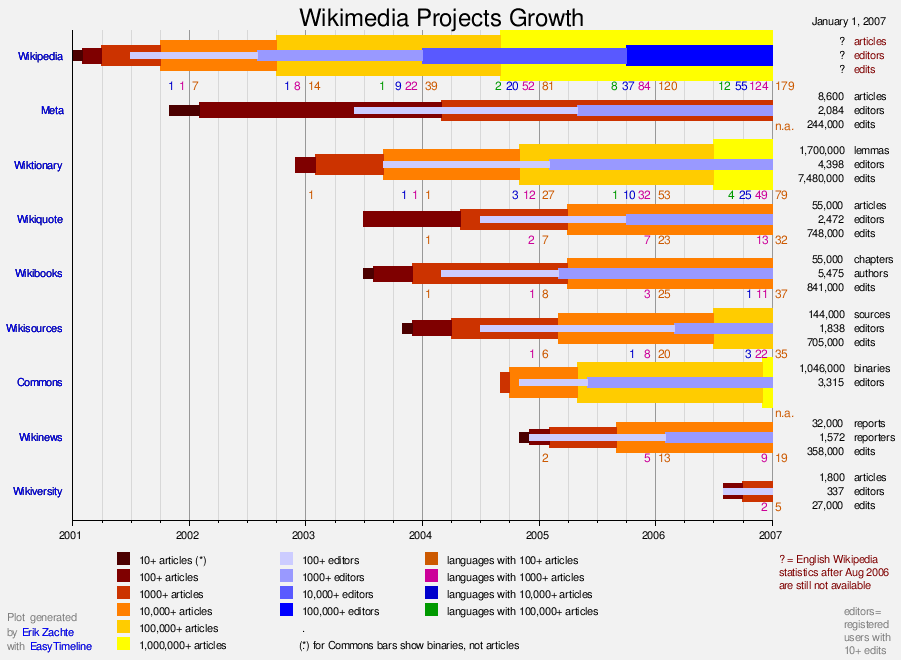
Echo[34]
The Echo extension provides an in-wiki notification system that can be used by other extensions. Thanks and Structured Discussions (Flow) are two MediaWiki extensions that make use of Echo.
Echo does not work unless email is enabled and a user is confirmed by email.
Notifications are shown here:

Embed Video[35]
| Release date | Title | link | Description |
|---|---|---|---|
| May 18, 2016 | Cross-Platform Replication - Part 1: Introduction, Dell Storage Manager, and Configuration |
youtube:QL8NGIfoZcc | This is part 1 of the 4-part video series on Dell Storage cross-platform replication. This part introduces the Dell Storage Manager GUI, and demonstrates how to add storage and configure iSCSI connections for replication.
For more information, see the cross-platform replication solutions guide at http://en.community.dell.com/techcenter/extras/m/white_papers/20442539 |
| May 18, 2016 | Cross-Platform Replication - Part 2: Replicate PS Series to SC Series |
youtube:5iTzVZCisjk | This is part 2 of the 4-part video series on Dell Storage cross-platform replication. This part demonstrates how to configure a volume for replication and manually replicate the volume.
For more information, see the cross-platform replication solutions guide at http://en.community.dell.com/techcenter/extras/m/white_papers/20442539 |
| May 18, 2016 | Cross-Platform Replication - Part 3: Failover PS Series to SC Series |
youtube:ltdxmHdvA7g | This is part 3 of the 4-part video series on Dell Storage cross-platform replication. This part demonstrates failing a volume over to the destination array.
For more information, see the cross-platform replication solution guide at http://en.community.dell.com/techcenter/extras/m/white_papers/20442539 |
| May 18, 2016 | Cross-Platform Replication - Part 4: Failback SC Series to PS Series |
youtube:xLR5zL0bdk8 | This is part 4 of the 4-part video series on Dell Storage cross-platform replication. This part demonstrates restoring or failing back the volume that was failed over in part 3.
For more information, see the cross-platform replication solution guide at http://en.community.dell.com/techcenter/extras/m/white_papers/20442539 |
Event Bus[36]
Ultimately required for Navigation Timing to work but is a requirement for Event Stream Config
EventBus -> EventStreamConfig -> EventLogging -> NavigationTiming
Event Logging[37]
Required by Navigation Timing
Event Stream Config[38]
Required by Event Logging which in turn is required by Navigation Timing
File Importer[39]
This extensions implements Special:ImportFile for importing files from other wikis, this will be found on the commons wiki
File Exporter[40]
On the Details page for an image file there should be an option "Export File" this is utilised to export an image to commons:

Flagged Revisions[41]
The Flagged Revisions extension allows for Editor and Reviewer users to rate revisions of articles and set those revisions as the default revision to show upon normal page view. These revisions will remain the same even if included templates or images are changed. This allows for MediaWiki to act more like a Content Management System (CMS).
- All pages should have this Revision Review Widget at the bottom of pages:

Flow
This extension has since been renamed Structured Discussions
Gadgets[42]
- Confirm there is a gadgets tab in user preferences:

Graph[43]
Header Tabs[44]
The Header Tabs extension transforms top-level MediaWiki headers into JavaScript-based tabs.
Each such top-level header, if it's anywhere above the <headertabs /> tag, it will be displayed as a tab.
So typically this goes at the end of a page if it is desired for all sections to be displayed as header tabs.
use:
__NOTOC__
= A =
Section 1
= B =
Section 2
= C =
Section 3
= D =
Section 4

<headertabs />
To achieve:


Hit Counters[45]
Hit Counters is the extension which is used to populate the data here: Special:Statistics
Horizontal Lists
Useful Keywords:
- write protect
- ProtectMode
- ExitOos
- RAID space below threshold
- HA_FLOW
./cyc_triage.pl -j -- -t xtremapp| egrep "write protect|ProtectMode|ExitOos|RAID space below threshold|HA_FLOW"
- entry1
- entry2
- entry3
- entry4
- entry5
- entry6
- entry7
- entry8
- entry9
Html 2 Wiki[46]
This extension provides the page Special:Html2Wiki for importing HTML exports of word docs etc..
ImageMap[47]
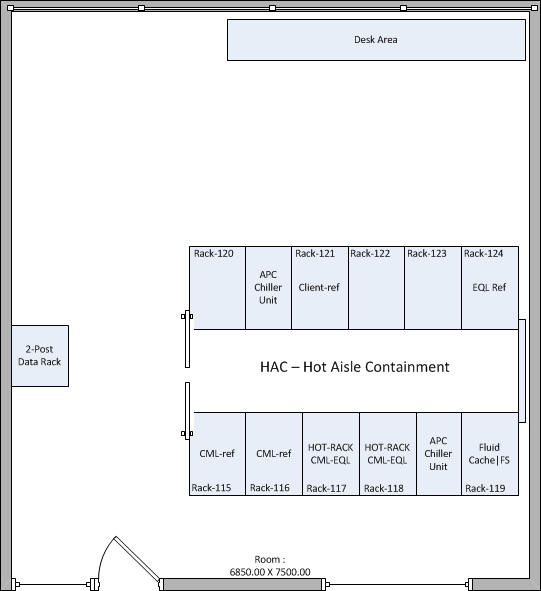
Input Box[48]
Search from here:
Inter Wiki Links
Check for existence of this: Special:Interwiki and check the links on this page all work..
Javascript Slideshow[49]
- This code is creating slide show floating right:
<slideshow sequence="random" transition="fade" refresh="2000">
<div>[[Image:Tasmanian-devil.jpg|thumb|right|128px|Tasmanian Devil]]</div>
<div>[[Image:Tweety.svg.png|thumb|right|128px|Tweety]]</div>
<div>[[Image:Sylvester_the_Cat.svg.png|thumb|right|128px|Sylvester The Cat]]</div>
<div>[[Image:Bugs_Bunny.png|thumb|right|128px|Bugs Bunny]]</div>
</slideshow>


Lingo[50]
Enabled Mouseovers for Abbreviations and commons terms from Terminology page
Lingo is now disabled in favour of Popups (Page Preview)
- Test Sentences:
- FTP and SCP are common protocols used to transfer files from PowerStoreT and PowerStoreX Nodes
__NOGLOSSARY__
Linter[51]
Required for Discussion Tools
Labeled Section Transclusion[52]
- Collapsed Collapsible Table cells below include transcluded content from other sections on this page, demonstrating java scripting and transclusion:
| Rabbit |
|---|
|
|
| Math |
|---|
|
|


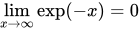
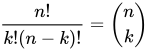



| Quiz |
|---|
|
|
Localisation Update[53]
Lockdown[54]
Long Hypen test
- Dell Storage – EqualLogic
SLN302154 Equallogic Troubleshooting HARDWARE COMPONENT FAILURE CRITICAL SLN302128 EQL eSupport - Delta Backup Process SLN302126 Qlogic 57810 - DCBX Configured by OS QOS Message Appears In Qlogic Control Suite And BACS
Maintenance[55]
- Convenience access to some Maintenance scripts via Special:Maintenance
Math [56]
Mermaid[57]
The Mermaid extension provides a parser function to help generate diagrams and flowcharts using the mermaid script language. See the README file for detailed instructions on how to install, configure and use this extension.
3 example use cases below:
Mobile Frontend[58]
Either use the devloper tools in the browser to simulate a mobile device, for example here in chrome:

Or view from an actual mobile device using VMware Web browser, either way confirm looks similar to this:

Modern Timeline[59]
The Modern Timeline extension provides a modern timeline visualization for Semantic MediaWiki as a result format.
This extension requires semantic mediawiki.
Multimedia Viewer[60]
- Clicking on Image should enable Multimedia Viewer, I have choose an image in commons due to possible config issues with AJAX and Cross Origin Requests:
MsUpload[61]
- Enables Drag & Drop uploading of files
- Adds "Drop Files Here" below the editing panel in the Source Editor:

LDAP Authentication[62][63]
Authentication is provided by the following plugins:
- LDAPAuthentication2
- LDAPAuthorization
- LDAPGroups
- LDAPProvider
- LDAPUserInfo
- PluggableAuth
Namespace Manager[64]
- Validate by confirming there are multiple customer namespaces on the search page such as L2 or L3
The NavigationTiming extension allows logging perceived latency measurements, exposed by browsers as part of the W3C Navigation Timing spec, which "defines an interface for web applications to access timing information related to navigation and elements".
This is installed on support wikis but not configured.
Nuke[66]
- The dangerous Nuke extension makes it possible for sysops to mass delete pages. It is accessed here Special:Nuke
NumerAlpha[67]
The NumerAlpha extension methods of inserting incrementing numbers, letters, and roman numerals into pages. You can reset the count at any moment or begin to a specified number.
Originally this extension was designed to supplement the Page Forms extension allowing to add a numbered table when you use the multiple option but you can also use it in templates by utilizing either the {{#tag: in |}} magic word or the {{#counter:}} parser function.
<ia>hello</ia> <ia>world</ia> <ia reset=1>goodbye</ia> <ia>world</ia> <ia begin=11>jupiter</ia> <ia>jazz</ia> |
a. hello |
<in>hello</in> <in>world</in> <in reset=1>goodbye</in> <in>world</in> <in begin=11>jupiter</in> <in>jazz</in> |
1. hello |
<ir>hello</ir> <ir>world</ir> <ir reset=1>goodbye</ir> <ir>world</ir> <ir begin=11>jupiter</ir> <ir>jazz</ir> |
i. hello |
Paged Tiff Handler[68]
Page Forms[69]
Page Forms (known before 2016 as Semantic Forms) is an extension to MediaWiki that allows users to add, edit and query data using forms. It was originally created as an offshoot of the mediawikiwiki:Extension:Semantic MediaWiki extension, to be able to edit templates that store their parameters via SMW, which is why it was originally called "Semantic Forms". However, it can now also work with the alternative mediawikiwiki:Extension:Cargo extension, or with neither extension installed.
Page Forms allows you to have forms for creating and editing pages on your wiki, as well as for querying data, all without any programming. Forms can be created and edited not just by administrators, but by users themselves.
Additional Special Pages:
- Special:CreateCategory
- Special:CreateClass
- Special:CreateForm
- Special:CreateProperty
- Special:CreateTemplate
- Special:MultiPageEdit
- Special:Forms
- Special:RunQuery
- Special:FormStart
- Special:Templates
View when page forms in implemented on page using parser function {{#default_form:form-name}}:

Page Images[70]
- Page images are listed on the
P?action=infopage for example:
http://labwiki.dub.emea.dell.com/wiki/Test?action=info
Page Triage[71]
- Provides a widget with flyouts for easy moderating of new pages:

Parser Functions[72]
- Parser Functions are heavily used all over the wikis, for example in the Set and Get Commmands on this page
PDF Handler[73]
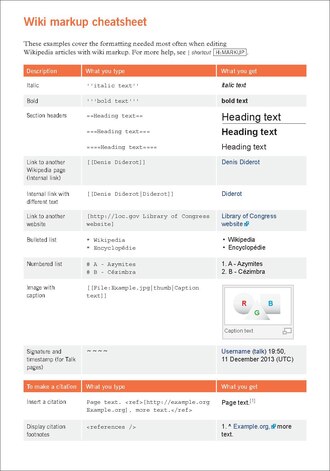
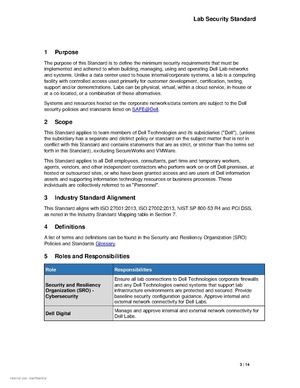
Popups[74]
The Popups extension displays page and reference previews when hovering over a link to an article or respectively to a reference. The former consists of summaries of an article's content, the latter shows the full content of the reference.
Preloader[75]
- In some Support wikis this is used to automatically add a "Draft" image and heading to each new page
- If this is not configured of your wiki add to LocalSettings.php
$wgPreloaderSource[ NS_MAIN ] = 'Template:Draft';
Pretty Table
| a | b | c | d | e | f |
|---|---|---|---|---|---|
| 1 | |||||
| 2 | |||||
| 3 |
Poem[76]
Preformatted Text similar to pre and code only difference being that wiki markup is allowed in side the tags:
If you can keep your head when all about you
Are losing theirs and blaming it on you,
If you can trust yourself when all men doubt you,
But make allowance for their doubting too;
If you can wait and not be tired by waiting,
Or being lied about, don’t deal in lies,
Or being hated, don’t give way to hating,
And yet don’t look too good, nor talk too wise:
If you can dream—and not make dreams your master;
If you can think—and not make thoughts your aim;
If you can meet with Triumph and Disaster
And treat those two impostors just the same;
If you can bear to hear the truth you’ve spoken
Twisted by knaves to make a trap for fools,
Or watch the things you gave your life to, broken,
And stoop and build ’em up with worn-out tools:
If you can make one heap of all your winnings
And risk it on one turn of pitch-and-toss,
And lose, and start again at your beginnings
And never breathe a word about your loss;
If you can force your heart and nerve and sinew
To serve your turn long after they are gone,
And so hold on when there is nothing in you
Except the Will which says to them: ‘Hold on!’
If you can talk with crowds and keep your virtue,
Or walk with Kings—nor lose the common touch,
If neither foes nor loving friends can hurt you,
If all men count with you, but none too much;
If you can fill the unforgiving minute
With sixty seconds’ worth of distance run,
Yours is the Earth and everything that’s in it,
And—which is more—you’ll be a Man, my son!
Quiz[77]
Rename User[78]
- Provides special page RenameUser
ReplaceText[79]
- Provides a rather danger special page ReplaceText to find a replace text across entire wiki, best to test in a wiki sand box first.
Recent Changes Cleanup[80]
- Provides a special page to clean up recent changes, test the existence of this special page for qualification:
http://labwiki.dub.emea.dell.com/wiki/Special:RecentChangesCleanup
Click and test: Special:RecentChangesCleanup
Sandbox Link[81]
- Provides a link to a personal sandbox for testing code at:
User:<User_Name>/sandboxa subpage of your user page

Set and Get Commands

Score[82]
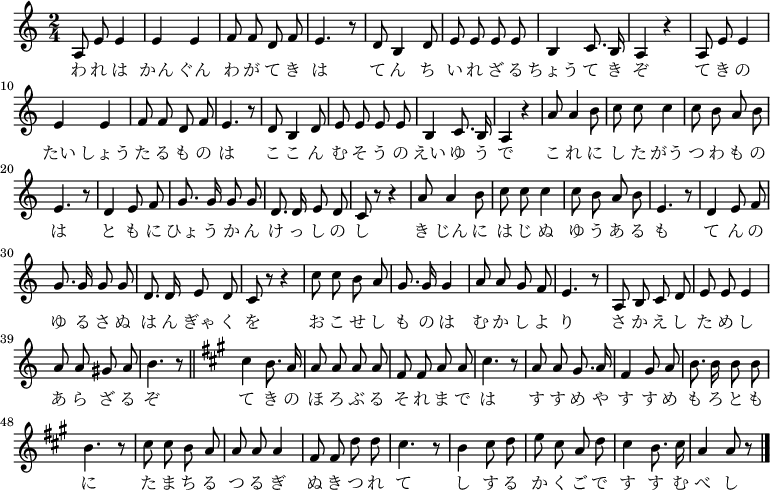
Scribunto[83]
If the following is sorted alphabetically Scribunto and Lua are installed and working:
- Apple
- Apple
- Apricot
- Apricot
- Avocado
- Avocado
- Banana
- Banana
- Bilberry
- Bilberry
- Blackberry
- Blackberry
- Blackcurrant
- Blackcurrant
- Blueberry
- Blueberry
- Boysenberry
- Boysenberry
- Cherimoya
- Cherry
- Cloudberry
- Coconut
- Cranberry
- Currant
- Damson
- Date
- Dragonfruit
- Durian
- Elderberry
- Feijoa
- Fig
- Goji berry
- Gooseberry
- Grape
- Grapefruit
- Guava
- Raisin
SVG Support
 Note: Note:
|
Lights On !! |
| File:One Pixel.png | File:One Pixel.png |
 Note: Note:
|
Lights Off !! |
Sphinx[84]
- Check if search engine is indexing new pages after 30 minutes
- Check if it is automatically recommending alternative spellings
- (ie recommending words in the index as replacements for words not in the index)
- Check if appropriately displaying search relative to the namespaces a user has permission to use
Spam Blacklist[85]
- Not used in support wikis
- Used to be used for preventing user name creation for non corporate formatted logins
Survey[86]
- Allows creation of surveys to display to users via this page: Special:Surveys
Structured Discussions[87]
This extension used to be called Flow.
The StructuredDiscussions extension provides a discussion and collaboration system for talk pages.
Go to any page, if the discussion tab looks similar to this the extension is loaded:

Syntax Highlighter[88]
see Testing Times
Templates


Highlight words in the middle of a sentence
This page is an early draft ... more to follow soon ...
- LUN Masking – Allocate a LUN number to a volume at the Storage Array and limit access to specific hosts, the storage controller enforces the access process
- Zoning – this is performed at the fibre switch level ensures initiators do not cross talk
Template Data[89]
- Creates the ability to add metadata to templates, currently used for Set and Get templates in compiki
- Metadata is best viewed by editing a Set or Get template in Visual Editor
Template Styles[90]
- Template Styles are required for Graphs to display properly on mobiles on this page ie page
- The style in this case is provided by Template:Graph:Chart/styles.css
- There is a special page for changing content styles from wikitext to css or json or raw etc: Special:ChangeContentModel
Thanks[91]
The Thanks extension adds a quick way to give positive feedback for productive contributions to MediaWiki sites. It allows users to send public 'thank you' notifications (via Echo) to other users for their individual edits and some logged actions.


TimedMediaHandler[92]
The TimedMediaHandler extension allows you to display audio and video files in wiki pages, using the same syntax as for image files. It includes the VideoJS Player. There is support for subtitles and captions (aka Timed Text) and real time stream switching between multiple WebM and other derivatives and many other features.
Example video on instant commons:
Example video on our commons:
Example 4K webm:
See also examples on mediawiki
UTF-8 Support Test
설치 및 사용 설명서
トールおよびユーザーズガイド バージョ
速入门指南
ي استخدام صفيفجهاز صفيف التخزينيصف هذا الدليل
מדריך התקנה והגדרה
Οδηγός εγκατάστασης και ρύθμισης
ക്യനാടുകൾ, ചൈന തുടങ്ങിയ നിരവധി രാജ്യങ്ങളിൽ
ভাষা পরিবর্তন করুন
русский
Vote
- Vote for this page here:

Visual Diffs[93]

A visual diff compares and shows differences between rendered (or displayed) documents, as opposed to showing the text (or markup) that is used to format such documents.
Since 2017, the main approach for visual diffs in MediaWiki is the visual diffs system (pictured) provided by the VisualEditor extension, which compares the HTML of two documents. It provides visual diffs in VisualEditor's editing preview, as well as (still as a beta feature) in MediaWiki's standard diff display.
Who Is Watching[94]
The WhoIsWatching extension allows to find out who is watching a particular page, and add others to watchlist for that page. It provides this Special:WhoIsWatching.
This extension also provides the {{#whoiswatching|Some Page}} parser function showing the number of watching users of Some Page plus providing a link to Special:WhoIsWatching/Some Page. This can be used with skins not supporting footer links or to create the WhoIsWatching link somewhere in a wiki page.
Whitespace[95]
| Name / size | →Instance← |
Example code and ... | Using {{spaces}} | Output | Output {{spaces}} |
|---|---|---|---|---|---|
| none | →← |
Some text<ref>...</ref>
|
Some text[1] | ||
| Hair | → ←
|
Some text{{hair space}}<ref>...</ref>
|
Some text{{spaces|hair}}<ref>...</ref>
|
Some text [1] | Some text [1] |
| 2-pixel | →←
|
Some text{{px2}}<ref>...</ref>
|
Some text[1] | ||
| Narrow no-break | → ←
|
Some text{{narrow no-break space}}<ref>...</ref>
|
Some text [1] | ||
| Thin | → ←
|
Some text{{thin space}}<ref>...</ref>
|
Some text{{spaces|thin}}<ref>...</ref>
|
Some text [1] | Some text [1] |
| Standarda | → ←
|
Some text <ref>...</ref>
|
Some text{{spaces}}<ref>...</ref>
|
Some text [1] | Some text [1] |
| En | → ←
|
1 3
|
1{{spaces|en}}3
|
1 3 | 1 3 |
| Figure | → ←
|
123<br/>1{{figure space}}3
|
123{{br}}1{{spaces|fig}}3
|
123 1 3 |
1231 3 |
| Em | → ←
|
1 3
|
1{{spaces|em}}3
|
1 3 | 1 3 |
a Provided here by a non-breaking space ( ).
Wiki Love[96]
WikiLove is an extension designed to promote the spread of WikiLove within Wikipedia and possibly other wikis. Specifically, it makes adding awards, gifts, and invitations to user talk pages as simple as clicking a few buttons.
This Heart icon will appear on a users personal page:

Wiki Editor[97]
The WikiEditor extension provides an improved interface for editing wikitext. It is the wikitext editing interface that Wikipedia started using in 2010 for desktop users, and so it is sometimes called the "2010 wikitext editor". The extension used to provide "Labs" features for "publication" and "preview" steps, but these are removed from Version 1.31 onwards.
This is the editor from Testing Times and Testing Times transcluded below:
Wiretap[98]
The Wiretap extension allows users to track the usage of the wiki from Special:Wiretap.
It will display the pages hits by users in reverse chronological order. It is heavily based on Extension:UserPageViewTracker, but records each individual hit instead of counting number of hits. Additionally, it tracks the referring page for each hit, so you can see how each user got to the page. Also, it tracks hits to the Special:Wiretap page itself, so all snooping is being tracked.
Widgets[99]
- There is a dedicated namespace for adding HTML code to transclude external services for example survey monkey:
References
- ↑ mediawikiwiki:Extension:AdminLinks
- ↑ mediawikiwiki:Extension:AdvancedSearch
- ↑ mediawikiwiki:Extension:ArticleCreationWorkflow
- ↑ mediawikiwiki:Extension:Babel
- ↑ mediawikiwiki:Extension:BetaFeatures
- ↑ mediawikiwiki:Extension:BugzillaReports
- ↑ mediawikiwiki:Extension:CategoryTree
- ↑ mediawikiwiki:Extension:CheckUser
- ↑ mediawikiwiki:Extension:Cite
- ↑ Did caleb clone vm?
- ↑ mediawikiwiki:Extension:CiteThisPage
- ↑ mediawikiwiki:Extension:Chart
- ↑ mediawikiwiki:Extension:CLDR
- ↑ mediawikiwiki:Extension:CleanChanges
- ↑ mediawikiwiki:Extension:ClipUpload
- ↑ mediawikiwiki:Extension:CodeEditor
- ↑ mediawikiwiki:Extension:CodeMirror
- ↑ Help:Template cheatsheet
- ↑ Template:Columns
- ↑ mediawikiwiki:Extension:Collection
- ↑ mediawikiwiki:Extension:CollapsibleVector
- ↑ mediawikiwiki:Manual:$wgForeignFileRepos
- ↑ mediawikiwiki:Extension:ConfirmEdit
- ↑ mediawikiwiki:Extension:ContributionScores
- ↑ mediawikiwiki:Extension:CSS
- ↑ mediawikiwiki:Extension:DataTransfer
- ↑ mediawikiwiki:Extension:DiscussionTools
- ↑ mediawikiwiki:Extension:DismissableSiteNotice
- ↑ mediawikiwiki:Extension:Display Title
- ↑ mediawikiwiki:Extension:DynamicPageList3
- ↑ https://help.fandom.com/wiki/Extension:DPL3/Manual
- ↑ mediawikiwiki:Extension:DynamicSidebar
- ↑ mediawikiwiki:Extension:EasyTimeline
- ↑ mediawikiwiki:Extension:Echo
- ↑ mediawikiwiki:Extension:EmbedVideo
- ↑ mediawikiwiki:Extension:EventBus
- ↑ mediawikiwiki:Extension:EventLogging
- ↑ mediawikiwiki:Extension:EventStreamConfig
- ↑ mediawikiwiki:Extension:FileImporter
- ↑ mediawikiwiki:Extension:FileExporter
- ↑ mediawikiwiki:Extension:FlaggedRevs
- ↑ mediawikiwiki:Extension:Gadgets
- ↑ mediawikiwiki:Extension:Graph
- ↑ mediawikiwiki:Extension:Header_Tabs
- ↑ mediawikiwiki:Extension:HitCounters
- ↑ mediawikiwiki:Extension:Html2Wiki
- ↑ mediawikiwiki:Extension:ImageMap
- ↑ mediawikiwiki:Extension:InputBox
- ↑ mediawikiwiki:Extension:JavascriptSlideshow
- ↑ mediawikiwiki:Extension:Lingo
- ↑ mediawikiwiki:Extension:Linter
- ↑ mediawikiwiki:Extension:Labeled Section Transclusion
- ↑ mediawikiwiki:Extension:LocalisationUpdate
- ↑ mediawikiwiki:Extension:Lockdown
- ↑ mediawikiwiki:Extension:Maintenance
- ↑ mediawikiwiki:Extension:Math
- ↑ mediawikiwiki:Extension:Mermaid
- ↑ mediawikiwiki:Extension:MobileFrontend
- ↑ Github:ProfessionalWiki/ModernTimeline
- ↑ mediawikiwiki:Extension:MultimediaViewer
- ↑ mediawikiwiki:Extension:MsUpload
- ↑ mediawikiwiki:Extension:LDAPAuthentication2
- ↑ mediawikiwiki:LDAP Stack
- ↑ https://github.com/hexmode/mediawiki-NamespaceManager
- ↑ mediawikiwiki:Extension:NavigationTiming
- ↑ mediawikiwiki:Extension:Nuke
- ↑ mediawikiwiki:Extension:NumerAlpha
- ↑ mediawikiwiki:Extension:PagedTiffHandler
- ↑ mediawikiwiki:Extension:Page_Forms
- ↑ mediawikiwiki:Extension:PageImages
- ↑ mediawikiwiki:Extension:PageTriage
- ↑ mediawikiwiki:Extension:ParserFunctions
- ↑ mediawikiwiki:Extension:PdfHandler
- ↑ mediawikiwiki:Extension:Popups
- ↑ mediawikiwiki:Extension:Preloader
- ↑ mediawikiwiki:Extension:Poem
- ↑ mediawikiwiki:Extension:Quiz
- ↑ mediawikiwiki:Extension:RenameUser
- ↑ mediawikiwiki:Extension:ReplaceText
- ↑ mediawikiwiki:Extension:Recent Changes Cleanup
- ↑ mediawikiwiki:Extension:SandboxLink
- ↑ mediawikiwiki:Extension:Score
- ↑ mediawikiwiki:Extension:Scribunto
- ↑ mediawikiwiki:Extension:SphinxSearch
- ↑ mediawikiwiki:Extension:SpamBlacklist
- ↑ mediawikiwiki:Extension:Survey
- ↑ mediawikiwiki:Extension:StructuredDiscussions
- ↑ mediawikiwiki:Extension:SyntaxHighlight
- ↑ mediawikiwiki:Extension:TemplateData
- ↑ mediawikiwiki:Extension:TemplateStyles
- ↑ [[mediawikiwiki:Extension:Thanks]
- ↑ mediawikiwiki:Extension:TimedMediaHandler
- ↑ mediawikiwiki:VisualEditor/Diffs
- ↑ mediawikiwiki:Extension:WhoIsWatching
- ↑ Help:Template cheatsheet
- ↑ mediawikiwiki:Extension:WikiLove
- ↑ mediawikiwiki:Extension:WikiEditor
- ↑ mediawikiwiki:Extension:Wiretap
- ↑ mediawikiwiki:Extension:Widgets